kirra-docs
KAD Text
Places text on the plan — plain labels, or values worked out from the blast with a formula.
Place text
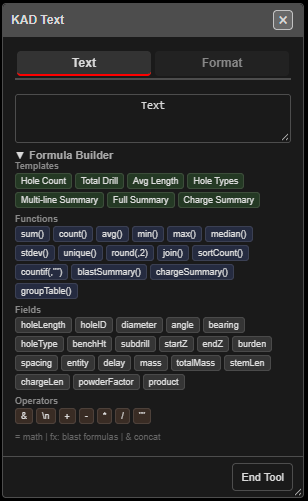
- Click Add KAD Text on the KAD toolbar. The KAD Text dialog opens and stays open.
- Type the text in the box on the Text tab.
- Click on the canvas. Each click places the current text — change the text between clicks to place different labels.
- Right-click to finish the drawing; click End Tool to close the dialog and stop.
Note: Type first, then click. The text is not asked for after you click.
Formulas
Text that starts with a marker is worked out when you place it:
| Starts with | Means | Example | Places |
|---|---|---|---|
fx: |
A blast formula — the same engine as print templates | fx:sum(holeLength[i]) |
the total drilled length |
fx:"Holes: "&count(holeID[i]) |
Holes: 120 | ||
= |
Basic maths | =5+3 |
8 |
=sqrt(16) |
4 |
Aggregate functions take any number of values: fx:sum(2,2) is 4, and
fx:sum(holeLength[i], 5) adds 5 to the field total.
Formula Builder
Click Formula Builder to open a palette of ready-made pieces. Click one to add it to the text.
- Templates — Hole Count, Total Drill, Avg Length, Hole Types, Multi-line Summary, Full Summary, Charge Summary
- Functions —
sum(),count(),avg(),min(),max(),median(),stdev(),unique(),round(,2),join(),sortCount(),countif(,""),blastSummary(),chargeSummary(),groupTable() - Fields — holeLength, holeID, diameter, angle, bearing, holeType, benchHt, subdrill, startZ, endZ, burden, spacing, entity, delay, mass, totalMass, stemLen, chargeLen, powderFactor, product
- Operators —
&(join text),\n(new line),+ - * /,""
When a formula fails
Calculation Error shows the formula, the reason and examples:
| Button | Result |
|---|---|
| Fix It | Places nothing, so you can correct the text |
| Cancel | Places nothing |
| As Text | Places the text literally, without the = or fx: marker |
Pictures (maps, legends, north arrows) only work in print templates, not in KAD text.
Format
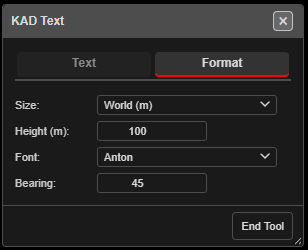 Format tab, showing one user’s saved settings.
| Setting | Default | What it does |
|---|---|---|
| Size: | World (m) | World (m) text is a real size on the ground and scales with zoom. Fixed (px) stays the same size on screen |
| Height (m): | 1 | Text height in metres (World). In Fixed mode this is Font Size (px):, default 12 |
| Font: | Anton | Anton, Hershey Simplex or Roboto |
| Bearing: | 0 | “Rotation in plan, degrees clockwise from horizontal. 0 = horizontal.” |
Kirra remembers these in this browser, and new text uses them after a reload.
Other ways to use it
| Method | Result |
|---|---|
| Snap on | Text anchors on a hole, vertex or line |
| Change the text between clicks | Several different labels in one session |
fx: formula |
Live blast figures placed as text |
| Backspace / Ctrl+Z | Removes or undoes the last text placed |
Troubleshooting
“No Text Entered”. The text box is empty — type something before clicking.
My label shows the formula, not the result.
It was placed with As Text, or it does not start with fx: or =.