kirra-docs
Export a Section and Build Solids
Once a block model is limited to the part you care about — a blast, a bench, the blocks inside a design solid — you can take that part out of Kirra in two ways:
- Export saves the blocks as a block model CSV.
- Solids turns them into closed solids, one per rock type or grade class.
Both buttons are in the footer of the Load Block Model dialog, and both use exactly the blocks the dialog is showing.
Which blocks are used
Both buttons use the blocks that pass everything on the Limits tab and the Bench slice on the Display tab: cut-offs, ticked categories or values, and the Limit display to box, surface or solid.
The Render cap (cells) is not a filter. It only limits how many blocks are drawn, so a capped display still exports, or builds solids from, every block that passes.
Export a section as CSV
- Set the limits so the dialog shows the blocks you want.
- Click Export.
- Choose where to save the file.
You can also export from the Export dialog: open the Geology tab and click Save on the Block Model — Vulcan CSV row. It writes the same blocks — those the model’s Load Block Model limits show. With more than one model loaded, Kirra asks which one.
The file is a Vulcan-style block model CSV, which Kirra reads straight back (see
Importing Block Models). It has no IJK column unless the
original model had one.
| Detail | Behaviour |
|---|---|
| File name | The model’s name, with _section added when the model is limited, for example STGM_section.csv. |
| Header | The original model’s origin, cell sizes and number of cells, so each block keeps its place in the parent grid. |
| Columns | Block centre (XC, YC, ZC), block size (XINC, YINC, ZINC), then every loaded attribute. |
| Categories | Written as their names, for example BIF, not as codes. |
| Empty values | Written as empty fields. |
| Rotated models | CSV has no field for rotation. Block centres stay exact, but the blocks draw unrotated when the file is loaded again. Kirra tells you when this applies. |
Build solids
Solids builds closed solids from the shown blocks. What you get depends on the Variable (colour) on the Display tab:
| Attribute | Result |
|---|---|
| A category, for example STRAT | One solid per category |
| A whole-number code, for example a stratigraphy number | One solid per value |
| A continuous value, for example DENSITY or FE | One solid of all the blocks shown — for example, set Cut-off: ignore below to 58 on FE for an ore shell |
- Choose the Variable (colour) and set the limits.
-
Click Solids. Kirra says how many solids it will build and from how many blocks:
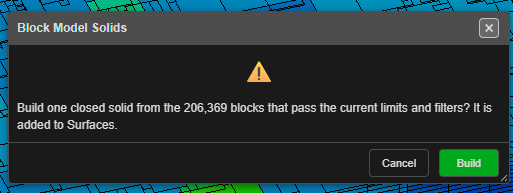
- Click Build.
The solids are added to Surfaces on a layer named Block Model Solids, each in the colour its blocks are drawn in. They are saved with the project like any other surface, and one Undo removes them all.
About the solids
- Closed. Each solid is watertight: it reads as Closed in its properties, shows its volume, and can be used as an Inside a closed solid limit.
- Stepped. The solids follow the block edges exactly. They are not smoothed.
- Exact volume. A solid’s volume equals the total volume of its blocks, sub-blocks included.
- Shared edges. Where two blocks of the same class touch only along an edge, that edge belongs to four faces rather than two. Mesh checks report these as non-manifold edges; the solid is still closed.
- Rotated models give rotated solids that match the drawn blocks.
- Very large selections are built on a coarser grid so they fit in memory. Kirra tells you when this happens and the grid size it used; limit the model further for exact solids.
- More than 256 classes is refused. Untick categories, or limit the model first.
See also: Importing Block Models · The Load Block Model Dialog · Trimesh Boolean & Solid Boolean