kirra-docs
Roads and Ramps
Digitises a graded road or ramp centreline and builds its strings — road edges, windrows, cross-lines and, if you want them, cut and fill walls with benches. The start of a haul-ramp design.
Work in progress: this tool is still being developed. Its options may change.
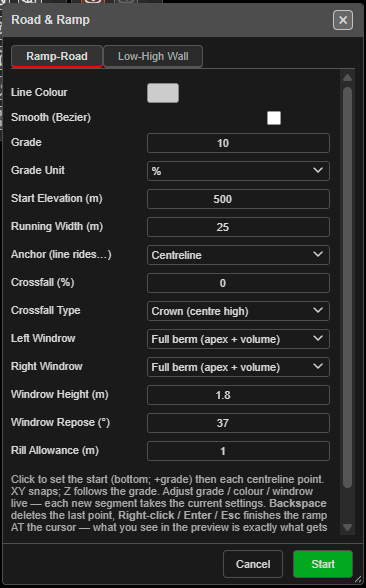
Draw a ramp
- Click Roads and Ramps on the KAD toolbar. The Road & Ramp dialog opens.
- Set the road on the Ramp-Road tab, and the walls on the Low-High Wall tab if you want them.
- Click Start. The dialog stays open — changes apply as you draw.
- Click the start point (the bottom of the ramp for a positive grade), then each centreline point. Before the first click, rings show the running and windrow widths.
- Right-click, Enter or Escape to finish. The ramp is built exactly as previewed.
Kirra reports “Road & Ramp: created … strings on layer …”, naming the layer the strings went to — Design / Ramps, or your active layer.
While drawing
| Key | Does |
|---|---|
| Hold Space | Snaps the point to a whole-metre elevation |
| Backspace / Delete | Removes the last point |
| Right-click, Enter, Escape | Finishes the ramp |
| Cancel in the dialog | Discards the ramp — “Road & Ramp: cancelled.” |
- The status line shows points, length, Z and grade as you go, and a readout shows Plan Dist, Segment Dist, Total Dist and Elevation.
- Heights come from Start Elevation (m) and the grade, not from Elevation Z.
- Points snap in plan (2D) or to drawing vertices (3D).
- Finishing with fewer than 2 points cancels.
Ramp-Road tab
| Field | Default | Notes |
|---|---|---|
| Line Colour | Cyan | Colour of the road strings |
| Smooth (Bezier) | Off | Smooths the centreline |
| Grade | 10 | 0 gives a flat road; a negative grade digitises downhill from the top |
| Grade Unit | % | %, degrees or 1:N |
| Start Elevation (m) | 0 | Elevation of the first point |
| Running Width (m) | 25 | Trafficable width |
| Anchor (line rides…) | Centreline | Whether your line is the Centreline, Left edge or Right edge |
| Crossfall (%) | 0 | Cross slope of the running surface |
| Crossfall Type | Crown (centre high) | None, Crown (centre high), Fall left or Fall right |
| Left Windrow / Right Windrow | Off | Off, Space allowance (flat) or Full berm (apex + volume) |
| Windrow Height (m) | 1.8 | |
| Windrow Repose (°) | 37 | |
| Rill Allowance (m) | 1.0 |
Low-High Wall tab
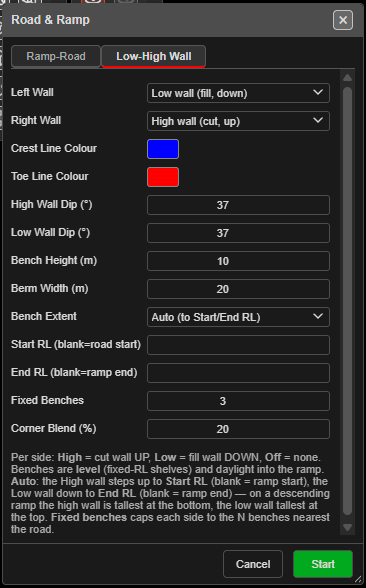
| Field | Default | Notes |
|---|---|---|
| Left Wall / Right Wall | Off | High wall (cut, up), Low wall (fill, down) or Off |
| Crest Line Colour / Toe Line Colour | Yellow / light blue | |
| High Wall Dip (°) | 65 | Batter angle of a high wall |
| Low Wall Dip (°) | 37 | Batter angle of a low wall |
| Bench Height (m) | 10 | |
| Berm Width (m) | 10 | |
| Bench Extent | Auto (to Start/End RL) | Auto steps the high wall up to Start RL and the low wall down to End RL; Fixed benches caps each side to the benches nearest the road |
| Start RL (blank=road start) / End RL (blank=ramp end) | Blank | |
| Fixed Benches | 3 | Used with Fixed benches |
| Corner Blend (%) | 35 |
Benches are level shelves that daylight into the ramp. The dialog remembers your settings.
What you get
- One line per string. Wall crests and toes are named by level, for example
470RL-C-a4jd(crest) and470RL-T-…(toe); other strings by role, for examplecrossLine-…. - One Ctrl+Z removes the whole ramp.