kirra-docs
Transform KAD
Moves, rotates and scales selected drawings by exact amounts, with a live preview.
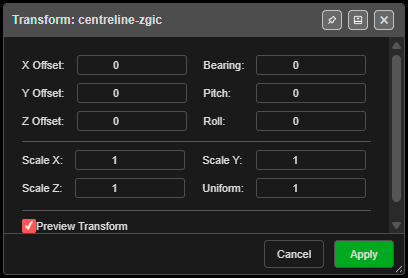
Transform drawings
- Select one or more drawings — points, lines, polygons, circles or text (Select toolbar, K).
- Click Transform KAD on the Modify toolbar. Transform: … opens with the drawing’s name, or the number selected.
- Type the amounts. With Preview Transform on, the drawings move as you type.
- Click Apply. Cancel, × or Escape puts everything back where it was.
With nothing selected Kirra says “Please select KAD objects to transform. This tool works with KAD entities only (points, lines, polygons, circles, text).” Locked drawings are not moved.
The fields
| Field | Default | What it does |
|---|---|---|
| X Offset:, Y Offset:, Z Offset: | 0 | Move, in metres |
| Bearing: | 0 | Rotate in plan, in degrees — positive is clockwise |
| Pitch:, Roll: | 0 | Tilt, in degrees |
| Scale X:, Scale Y:, Scale Z: | 1 | Stretch along each axis |
| Uniform: | 1 | “Sets X, Y and Z together” |
| Preview Transform | On | Shows the result live |
Kirra scales first, then rotates, then moves — all about the centre of the selection.
Other ways to use it
| Method | Result |
|---|---|
| Escape | Cancels and restores the originals |
| Switch the button off | The same as Cancel |
| Dock the dialog (pin in the title bar) | Keeps it beside the canvas while you work |
Undo
Apply is one Ctrl+Z step — “Transform KAD entities”.
Related
- Move — drag by hand
- Modify Toolbar