kirra-docs
Blast Analysis Shader
The Blast Analysis Shader paints a vibration, damage, pressure or powder-factor model across a surface around your blast, so you can see how far an effect reaches and where it is strongest. Most models run on the graphics card, so a result appears in seconds; one runs in the background on the processor.
This is a different tool from the PPV Voronoi modes, which colour one cell per hole against your monitors. The shader paints a continuous field over the ground.
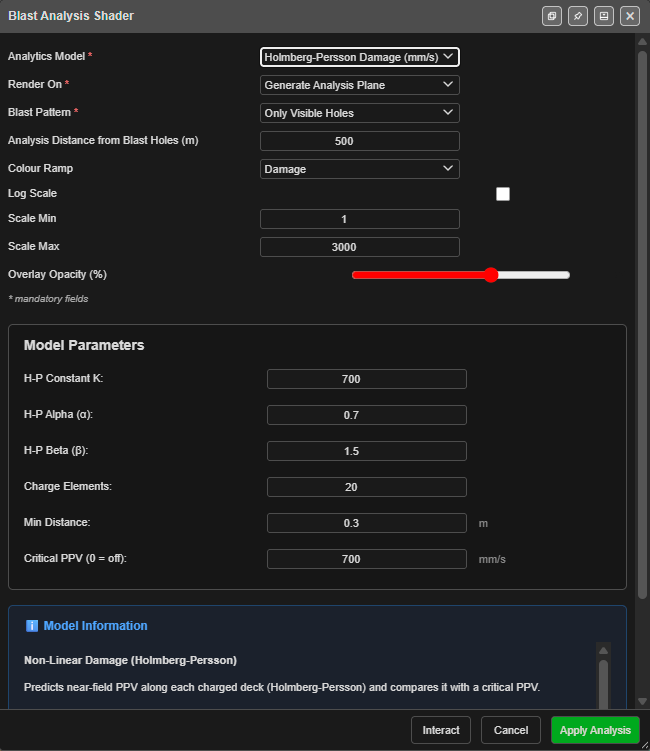 The dialog on Holmberg-Persson Damage. Values shown are one user’s settings.
Prerequisites
- A blast loaded. Charging on the holes gives the best result; without it, models assume a charge over 70 % of each hole.
- Timing on the holes, for the time-based models and Interact.
- Optional: a surface to paint on. Without one, Kirra makes a flat plane.
How to run an analysis
- Click Blast Analysis Shader on the Analyse toolbar. Kirra switches to the 3D view and opens the dialog.
- Choose the Analytics Model.
- Choose Render On — Generate Analysis Plane, or a loaded surface.
- Choose the Blast Pattern to analyse.
- Adjust the model’s settings under Model Parameters if needed.
- Click Apply Analysis.
Kirra shows Baking analysis… and adds a new surface named, for example, Analysis Scaled Heelan_ab12, on the Analysis layer, with its own legend. It shows in 2D and 3D.
- The surface you painted on is copied, not changed.
- A generated plane sits at the Drawing RL, or at the average collar height if no Drawing RL is set.
- When you move holes or change timing, the analysis surface updates itself shortly afterwards (all models except the time-domain one).
To remove an analysis, use Undo straight away, or delete the surface like any other.
The dialog
| Field | Default | What it does |
|---|---|---|
| Analytics Model | Scaled Heelan Fast | The model — see the table below |
| Render On | Generate Analysis Plane | A flat plane, or a loaded surface to paint |
| Blast Pattern | Only Visible Holes | Only Visible Holes, All Blast Holes, or one blast |
| Analysis Distance from Blast Holes (m) | 200 | How far from the holes to analyse. A generated plane extends this far; a surface is cropped to this distance. Smaller is sharper and faster |
| Colour Ramp | Set by the model | The colours used |
| Log Scale | Set by the model | Spread the colours on a log scale |
| Scale Min / Scale Max | Set by the model | The colour range, in the model’s unit. Values below Scale Min are not drawn |
| Overlay Opacity (%) | 70 | How solid the result is. Change it later in the surface’s properties |
Changing the model resets the ramp, Log Scale and the scale to that model’s defaults. Model Parameters holds the model’s own settings, and Model Information explains the model.
Buttons
| Button | What it does |
|---|---|
| Apply Analysis | Runs the model and adds the analysis surface. For the time-domain Blair & Minchinton model it reads Compute |
| Interact | Opens Time Interaction to step through the firing — see below. Not shown for the time-domain model |
| Cancel | Closes the dialog |
If the blast has more holes or decks than the model can draw, Kirra asks first — Run anyway draws as many as it can; Let me reduce it returns to the dialog.
The models
| Analytics Model | Unit | What it shows | Limit |
|---|---|---|---|
| Peak Particle Velocity (PPV) | mm/s | Site-law PPV from each hole | 2048 holes |
| Heelan Original (Blair & Minchinton 1996) | mm/s | Directional vibration from each charge (Heelan) | 1024 decks |
| Scaled Heelan Fast (based on Blair & Minchinton) | mm/s | Heelan directional pattern scaled to your site law | 1024 decks |
| Holmberg-Persson Damage | mm/s | Near-field PPV along each charge, against a critical PPV | 1024 decks |
| Borehole Pressure | MPa | Pressure from each charge, falling with distance | 512 decks |
| Volumetric Powder Factor | kg/m³ | Explosive energy per volume of rock | 2048 decks |
| Jointed Rock Damage | damage ratio | Damage by intact-rock fracture and/or joint slip | 1024 decks |
| PPV (Per-Deck) | mm/s | Site-law PPV from each deck | 2048 decks |
| Blair Lite — Scaled Heelan 90% (Blair Radiation) | mm/s | Scaled Heelan with Blair’s radiation pattern | 1024 decks |
| Temporal Lifecycle (VOD Ramp) | mm/s | Each charge detonating from its primer at the explosive’s VOD | 512 decks |
| Scaled Heelan (Blair & Minchinton, Time-Domain) | mm/s | Full waveform synthesis on the processor | — |
| Ripple Tank — Forward Wave Field | mm/s | The travelling P and S wave fronts | 2048 holes |
Each model’s settings and defaults are listed in PPV & Vibration Models.
Time Interaction
Interact draws a live analysis and opens Time Interaction, so you can step through the firing and see the effect build up hole by hole.
| Control | What it does |
|---|---|
| Rewind to start, Step -0.5ms, Play / Pause, Stop, Step +0.5ms, Forward to end, Loop | Move through time, as in Blast Animation |
| Play Speed | Playback speed |
| Time slider | Drag to a moment. It starts at the end, so the full blast shows first |
| Generate | Saves the analysis at the current time as a surface |
| Cancel | Closes it and removes the live analysis |
The time-domain model
Scaled Heelan (Blair & Minchinton, Time-Domain) builds the full vibration waveform. It runs in the background with a progress window — expect it to take longer — and has no Interact. Its result is saved with the surface, so it does not need recomputing after a reload.
Display Time (ms): chooses one moment to show; -1 shows all decks.
Interference — what the models show
Two models add waves with their sign, so waves can reinforce or cancel:
- Scaled Heelan (Blair & Minchinton, Time-Domain) — full waveform synthesis, for prediction.
- Ripple Tank — Forward Wave Field — simple wavelets, for seeing the idea. Its own information panel says it is an “Educational visualisation — not a quantitative blast-prediction tool”, and not for compliance.
The other vibration models add up the energy from each charge, which can only grow. Temporal Lifecycle shows the order and timing of the burn along each charge, not interference.
Colour ramps
The ramps are Ppv, Jet, Viridis, Damage, Compliance, Grey, Sdob, Pressure, Spectrum, Thermal, Rgb and Diverging. Each model starts with its own (for example Jet for the Heelan models, Damage for Holmberg-Persson, Diverging for Ripple Tank); change it in Colour Ramp.
Saving and exporting
- Analysis surfaces are saved with the workspace and travel in KAP projects.
- To use one outside Kirra, export it as a baked GLB — see GLTF / GLB export.
- The dialog remembers your last settings for the same model.
Troubleshooting
Nothing appears after Apply Analysis. Check the Blast Pattern choice includes visible holes, and that Scale Min is not above your values.
“Too many charged decks for this model”. The blast has more decks than the model can draw. Choose one blast in Blast Pattern, or a model with a higher limit.
The colours are all one end of the ramp. Adjust Scale Min and Scale Max, or switch Log Scale.
Related
- PPV & Vibration Models — every model’s settings
- PPV Voronoi Modes — per-hole vibration against monitors
- Flyrock Modelling
- Charging Overview