kirra-docs
Radii
Draws a circle (or star) of a set radius around each selected hole or drawing point, and can merge overlapping circles into one outline. Use it for stand-off zones, clearance radii and exclusion outlines.
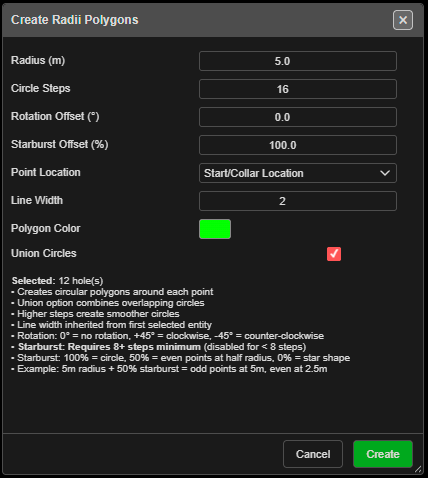
Draw radii
- Select holes, or drawings — points, lines and polygons (each vertex), text, circles, or vertices in V mode.
- Click Radii Holes/KADs on the Modify toolbar. Create Radii Polygons opens and lists what is selected, for example “Selected: 12 hole(s)”.
- Set the radius and options, then click Create.
With nothing selected Kirra says “Please select holes or KAD entities first, then activate the Radii tool.”
The fields
| Field | Default | What it does |
|---|---|---|
| Radius (m) | 5.0 | Circle radius. Must be more than 0 |
| Circle Steps | 16 | Points around each circle (3 – 100). More is smoother |
| Rotation Offset (°) | 0.0 | Turns each circle (−360 to 360; positive is clockwise) |
| Starburst Offset (%) | 100 | 100 % is a circle; lower pulls every second point in to make a star. Needs 8 or more steps |
| Point Location | Start/Collar Location | Or End/Toe Location — circles around the toes |
| Line Width | From the first selection, else 2 | |
| Polygon Color | From the first selection, else green | |
| Union Circles | On | Merges overlapping circles into one outline |
Example from the dialog: “5m radius + 50% starburst = odd points at 5m, even at 2.5m”.
What you get
Closed polygons named after the blast or drawing they came from and the radius — for example
BLAST-01_Radii_5m_ab12, or …_RadiiUnion_… when merged and …_RadiiToe_… around toes. They go
on the Boundaries / Radii layer, or your active layer. The whole set is one undo step, and
the tool switches off afterwards.
Troubleshooting
“Please enter a valid radius > 0”. A circle cannot have a negative radius. To shrink an outline, use Offset KAD with a negative distance.
“Starburst offset” is greyed out. Set Circle Steps to 8 or more.