kirra-docs
Offset KAD
Draws copies of a line or polygon at a set distance — outwards or inwards — optionally rising or falling as it goes. Use it for offset crests, toes, buffer lines and stand-off boundaries.
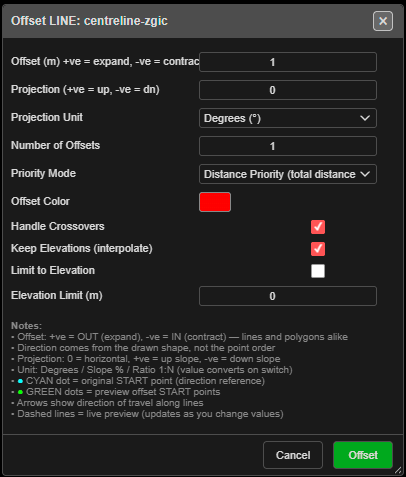
Offset a line or polygon
- Click Offset KAD on the Modify toolbar. The status line reads “Offset Tool: click a line or polygon to offset (right-click to exit)”.
- Click a line or polygon. Offset LINE: … or Offset POLY: … opens, and a dashed preview shows the result.
- Set the distance and options, then click Offset.
- The tool stays on — click the next line, or right-click the canvas to finish.
Points cannot be offset. A click on empty space reads “Offset: click on a line or polygon”.
The fields
| Field | Default | What it does |
|---|---|---|
| Offset (m) +ve = expand, -ve = contract | 1.0 | Distance. Positive goes out, negative in — for lines and polygons alike (−100 to 100) |
| Projection (+ve = up, -ve = dn) | 0 | Rise or fall as the offset moves out |
| Projection Unit | Degrees (°) | Degrees (°), Slope (%) or Ratio (1:N). Changing it converts the value |
| Number of Offsets | 1 | Up to 10 copies, each a further step out |
| Priority Mode | Distance Priority (total distance) | Or Vertical Priority (vertical distance) |
| Offset Color | Red | Colour of the new lines |
| Handle Crossovers | On | Cleans up where the offset folds over itself |
| Keep Elevations (interpolate) | On | New points take heights interpolated from the original |
| Limit to Elevation | Off | Stop the offset at an elevation |
| Elevation Limit (m) | 0.0 | The elevation used by Limit to Elevation |
From the dialog: “Direction comes from the drawn shape, not the point order.” The cyan dot marks the original start point; green dots mark the preview start points.
The dialog remembers your settings for the session.
What you get
New lines named after the original and the distance, for example Crest_Offset_5m_ab12, on the
Design / Offsets layer — or your active layer. Kirra reports “Created … offset(s)
successfully”. Several offsets are one undo step.
With a section plane active in 3D, the offset is made in that plane.
Other ways to use it
| Method | Result |
|---|---|
| Stays on after each offset | Offset one line after another |
| Right-click the canvas | Ends the tool |
| Cancel in the dialog | Closes the dialog and ends the tool |
| Number of Offsets | A set of evenly spaced copies in one go |
Related
- Radii — circles around points
- Layer Organisation
- Modify Toolbar