kirra-docs
Router-Chamfer
Rounds off (router) or cuts across (chamfer) chosen corners of a line or polygon.
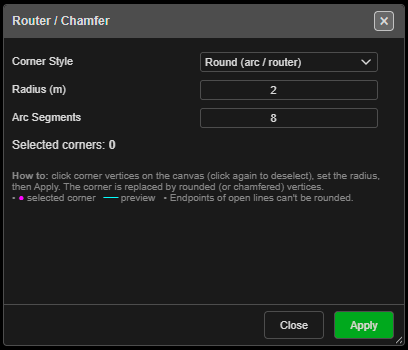
Round or bevel corners
- Click Router-Chamfer on the Modify toolbar. The Router / Chamfer palette opens.
- Click the corner vertices to change. Click one again to drop it. Selected corners are marked in magenta and counted under Selected corners:.
- Choose the style and radius — a preview shows the result.
- Click Apply. The palette stays open for more corners.
- Close the palette, or right-click twice quickly on the canvas, to finish.
The end points of an open line cannot be rounded — “endpoints can’t be rounded — pick an interior corner.”
The fields
| Field | Default | What it does |
|---|---|---|
| Corner Style | Round (arc / router) | Or Chamfer (straight bevel) |
| Radius (m) | 2 | Size of the round or bevel |
| Arc Segments | 8 | Smoothness of a round corner (1 – 64). Greyed out for chamfer |
If a corner is too tight for the radius, the palette warns “Radius clamped to fit on … corner(s) — max here ≈ … m” and uses the largest radius that fits.
The palette remembers its settings for the session.
Other ways to use it
| Method | Result |
|---|---|
| Right-click the canvas | Clears the selected corners |
| Right-click twice quickly | Ends the tool |
| Works in 3D | Pick corners in either view |
Undo
Each Apply is one Ctrl+Z step. The line is changed in place.