kirra-docs
Simplify RDP
Removes unneeded points from a line or polygon while keeping its shape within a tolerance (Ramer–Douglas–Peucker). Use it to thin dense survey strings and imported drawings.
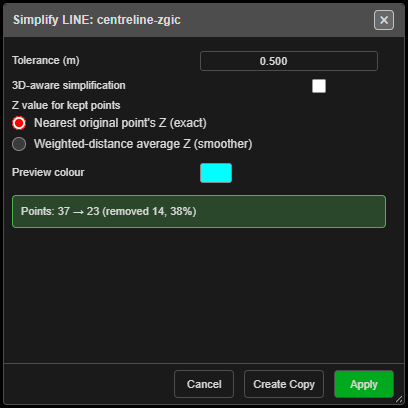
Simplify a line or polygon
- Click Simplify RDP on the Modify toolbar. The status line reads “Simplify Tool: click a line or polygon to simplify (right-click to exit)”.
- Click a line or polygon. Simplify LINE: … or Simplify POLY: … opens with a preview and a count, for example “Points: 37 → 23 (removed 14, 38%)”.
- Adjust the tolerance until the preview looks right.
- Click Apply to change the drawing, or Create Copy to keep the original and add a simplified copy. Either way the tool stays on.
Points cannot be simplified, and a drawing needs at least 3 points.
The fields
| Field | Default | What it does |
|---|---|---|
| Tolerance (m) | 0.5 | How far a removed point may be from the simplified line. Larger removes more |
| 3D-aware simplification | Off | Takes height into account as well as plan position |
| Z value for kept points | Nearest original point’s Z (exact) | Or Weighted-distance average Z (smoother) |
| Preview colour | Cyan |
The dialog remembers its settings for the session.
What you get
- Apply — the drawing is simplified in place. “Simplified …: 37 → 23 points (removed 14)”.
- Create Copy — a new drawing named
Name_simplified_…in a Simplified sub-layer.
Each is one Ctrl+Z step. If nothing can be removed: “Simplify: no points removed (try a larger tolerance)”.
Other ways to use it
| Method | Result |
|---|---|
| Right-click the canvas | Ends the tool |
| Cancel, × or Escape | Closes the dialog and ends the tool |
| Works in 3D | Pick in either view |