kirra-docs
Print from Template (XLSX)
Kirra can generate formatted reports using custom XLSX spreadsheet templates. The template system reads your active blast data and populates fields, maps, and statistics into a professional layout. Use this when you need company-specific formats, multi-page reports, or data exported for further editing in Excel.
How to Access
Click the Import Export Print button (file icon) in the menu bar and choose Print — or open the left sidenav (☰) and click Print under Print Management. Both open the PDF Print dialog.
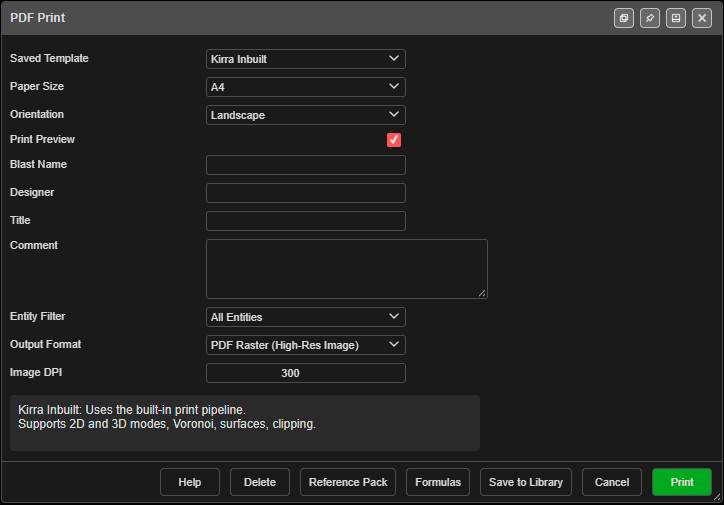 The PDF Print dialog.
The dialog’s main fields are Saved Template, Paper Size and Orientation (From Sheet uses the custom template’s own setting), Print Preview, Blast Name, Designer, Title, Comment, Entity Filter, Output Format, and either Image DPI (Kirra Inbuilt) or Override template DPI setting and DPI (a custom template). Footer buttons: Save to Library, Formulas, Reference Pack, Delete, Help, and Print.
Template Options
Kirra Inbuilt
The Kirra Inbuilt template is a built-in report format that requires no setup. It provides a title block, map zone, and a footer with north arrow, legend, and statistics, and supports:
- 2D and 3D views
- Voronoi overlays
- Surface clipping to the print boundary
- Paper size and orientation chosen in the dialog (XLSX output is not available)
Choose Kirra Inbuilt when you want a quick, standard report without creating a custom template.
Image DPI
With Kirra Inbuilt selected, the dialog shows an Image DPI field in place of the template DPI controls. It sets the resolution of aerial images on the page.
The Print to PDF button in Print Management (left sidenav ☰) prints the same Kirra Inbuilt layout through the Print Settings dialog, which has the same Image DPI field. Both remember one shared value.
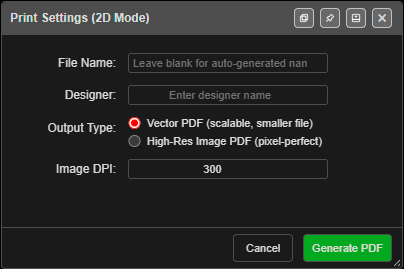 The Print Settings dialog, with Image DPI at its default of 300.
| Setting | Value |
|---|---|
| Range | 72 to 600 |
| Default | 300 |
| Remembered | Yes, for the next print |
- ECW imagery is read again from its file at this resolution, up to the detail the file holds. A higher DPI gives a sharper print.
- GeoTIFF imagery cannot gain detail it does not have. A higher DPI only makes a bigger PDF.
- High-Res Image PDF pages stop at 300, whatever you enter.
- Higher values take longer to make and give a bigger PDF.
Custom XLSX Templates
Upload your own XLSX spreadsheet to create fully custom layouts. Your template can include:
- Placeholder fields — Cells that reference hole properties, pattern statistics, and project metadata
- Formula cells — Expressions that start with
fx:and are evaluated against blast data - Render tokens — Special placeholders for map views, legends, north arrows, and scale bars
- Multiple sheets — Each sheet becomes one page; multi-page templates use multiple sheets
- Tabular layouts — Tables of hole data, charge summaries, or timing sequences
Kirra print cells use the fx: print-template engine (not Deck Builder charging formulas). See the Formula Engine hub and the Print Formula Reference before mixing syntax from charge decks.
Template Workflow
- Choose – Select or Import – in Saved Template, then click Import Template (.xlsx) (or pick a template you saved earlier)
- Kirra reads cells, merged regions, styles, and images
- Evaluate — Cells with the
fx:prefix are evaluated against your blast data - Output — Choose PDF (raster or vector) or a populated XLSX spreadsheet
For large templates, Kirra uses a background process to parse the file. A progress dialog appears so the interface stays responsive.
Paper Size and Orientation
From Sheet (the default) prints each sheet at the paper size and orientation set in Excel’s Page Setup. Excel sheets set to A2, A5, B4 or B5 print at that size.
Pick a size in Paper Size or Orientation to print on different paper without editing the template:
- Choices are A4, A3, A2, A1, A0, Letter, Legal and Tabloid.
- The sheet is enlarged (or reduced) to fit the new page, keeping its proportions, and centred.
- For example, an A3 template printed on A1 is drawn at twice the size.
- Map views gain resolution with the enlargement, so they stay sharp on the bigger page.
Map View Resolution (DPI)
Each mapView formula can carry its own DPI, for example fx:mapView(r, 300). The two DPI controls in the dialog decide whether that number is used.
| Override template DPI setting | What prints |
|---|---|
| Unticked (default) | Raster map views use the DPI in their formula, or 200 if it has none. Vector map views draw their aerial images at 200. |
| Ticked | Every map view, raster or vector, uses the DPI you enter for its images. |
- DPI accepts 72 to 600 and is greyed out while the box is unticked.
- Both settings are remembered for the next print.
- ECW imagery is read from its file at the chosen DPI, up to the detail the file holds. See ECW Imagery.
Text from Excel
Template text follows the cell formatting in your spreadsheet:
- Font family: sans-serif fonts such as Calibri and Arial print as Helvetica. Serif fonts such as Times New Roman, Cambria and Georgia print as Times. Fixed-width fonts such as Courier and Consolas print as Courier.
- Bold, italic, size and colour carry across as set in Excel.
- Shrink to fit: text too wide for its cell is reduced until it fits. It is never enlarged, and wrapped cells are not shrunk, as in Excel.
- Indent: each indent level moves the text in from the cell edge, as Excel does.
- Symbols and other alphabets: characters such as ▬ ● ▲ ◉ print correctly, as does Russian and Mongolian text.
Reference Template
Click Reference Pack in the PDF Print dialog to download Kirra-DesignPRINTReferenceTemplate.zip — a starter template, the formula reference and the print skill — with examples of:
- Scalar variables (blast name, designer, date, hole count, drill metres, etc.)
- Iterated fields (hole length, diameter, coordinates per hole)
- Aggregation functions (sum, average, min, max)
- Render tokens for map views, legends, and north arrows
Use it as a starting point for your own custom templates.
Example Templates
Downloadable example templates are available that demonstrate advanced features not covered by the basic reference template:
- Voronoi Showcase — All 10 Voronoi metric codes with paired legends across fixed, min-max, and default legend modes
- Hole Section Grid —
[+>]grid pagination withholeSection()render tokens,filter()directives, and math-wrapped indexed fields - Multi-Map Views — Multiple map views on one page with different display code combinations
- Charging Report —
blastSummary(),chargeSummary(),productList(),groupTable(), and per-hole charging tables - Hole Data Table — Per-row
[++]tables with footer aggregations, filtered subsets, and measured data
See Template Examples for detailed walkthroughs of each template, and Print Formula Reference for the complete list of all variables, functions, and display codes.
Output Formats
| Format | Description |
|---|---|
| PDF Raster (High-Res Image) | Pixel-based rendering; matches complex visuals exactly |
| PDF Vector (Scalable) | Scalable lines and text; smaller file size |
| XLSX (Populated Spreadsheet) | Populated spreadsheet; edit further in Excel (custom templates only) |
The XLSX output option is available only when using a custom template. Use it when you need to export data to Excel for further editing or reporting.
Aerial images and full-page pictures are stored in the PDF as JPEG, and everything else is compressed, so a print over imagery stays a manageable size to email.
Related Topics
- Formula Engine — three engines; print vs charging vs blast group
- Print Formula Reference — Complete list of all variables, functions, display codes, and render tokens
- Template Examples — Downloadable example templates with detailed walkthroughs
- Statistics & Voronoi
- Charging Overview
- Interface Tour