kirra-docs
Blast Animation
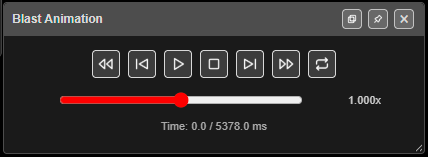
Plays the firing sequence back in time. Each hole lights up as it fires, so you can watch the blast move across the pattern and check the timing reads the way you designed it.
Prerequisites
- A blast with timing — ties, or electronic delays.
- The holes you want to see must be visible. Hidden holes are not played.
How to play a blast
- Click Blast Animation on the Analyse toolbar. The Blast Animation bar opens.
- Click Play. Holes light up in firing order. Click again (Pause) to stop on the current time.
- Drag the speed slider to play slower or faster.
- Close the bar with × in its title bar.
The controls
| Control | What it does |
|---|---|
| Rewind to start | Jumps to time 0 |
| Step -0.5ms | Steps back half a millisecond |
| Play / Pause | Starts and pauses playback |
| Stop | Stops and returns to time 0 |
| Step +0.5ms | Steps forward half a millisecond |
| Forward to end | Jumps to the last hole |
| Loop | Plays again from the start when it reaches the end. Off when Kirra starts |
| Speed slider | From 0.01× (far left) through 1× (centre) to 10× (far right). The speed is shown beside it, for example 1.000x |
The time reads Time: current / total ms. The total is the fire time of the last visible hole. Playback runs a little past the end before it stops or loops.
What you see
| While playing | Paused or stepping | |
|---|---|---|
| 2D | Fired holes filled orange with a yellow outline | Fired holes green |
| 3D | Fired holes red with a yellow outline | Fired holes green |
Closing the bar stops playback and clears the fired holes.
Warnings
The bar can show a warning above the controls:
- “⚠ … hole(s) have electronic detonators without baked delays — they fire at their programmed time, not your tie times, so playback will not follow the ties.” Bake the delays first — Bake Delay on the Connect toolbar.
- “⚠ All … visible holes fire at the same time … — there is no sequence to play.” Check the ties or the detonator delays.
Troubleshooting
Nothing happens when I click Play. Check the warning line — every visible hole may fire at the same time, or the blast has no timing.
Playback ignores my ties. The holes have electronic detonators with delays that have not been baked. Use Bake Delay on the Connect toolbar.
Some holes never light up. They are hidden. Show them in the Data Explorer.
Related
- Time Window — timing analysis
- Analyse Toolbar