kirra-docs
Monitor Points & Seed Library
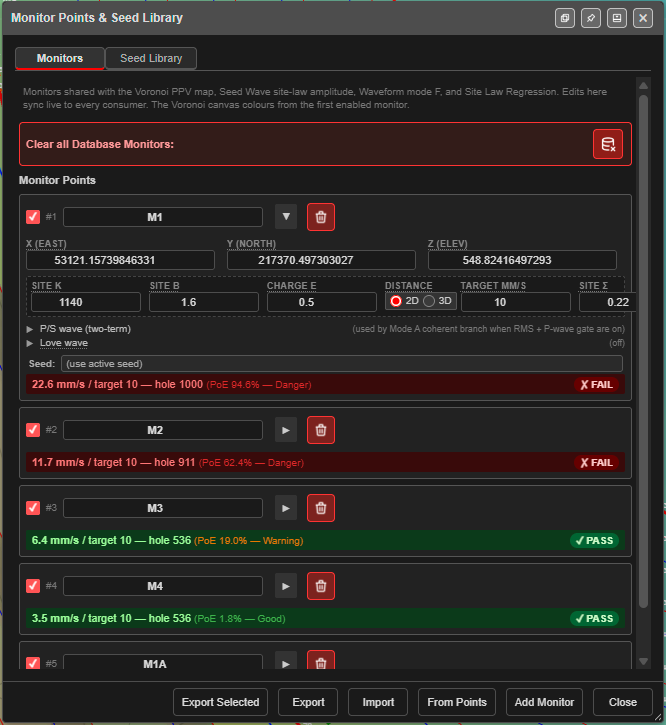
Monitors are the places you need to protect from vibration — a house, a fence line, a pipeline, a highwall. Each one carries its own site law and target. They drive the PPV Voronoi modes, the Seed Wave and Forward Array tabs of Time Window, and Site Law Regression. The Seed Library holds measured vibration traces used to shape the predicted waves.
Open it
Click Monitor Points Manager on the Analyse toolbar. The dialog is Monitor Points & Seed Library, with two tabs: Monitors and Seed Library. The buttons along the bottom change with the tab.
You can also open it from Voronoi Options, with the button beside Full editor:.
Monitors tab
“Monitors shared with the Voronoi PPV map, Seed Wave site-law amplitude, Waveform mode F, and Site Law Regression. Edits here sync live to every consumer.”
Add monitors
| Button | What it does |
|---|---|
| Add Monitor | Adds a monitor at the centre of the loaded data, named VM1, VM2 … Edit its position afterwards |
| From Points | Turns every visible KAD point into a monitor, named drawing#point. Lines, polygons and text are skipped |
| Import | Replaces all monitors from a CSV, or from a ZIP saved with seeds. If you have monitors, Kirra asks Replace all monitors? first |
The monitor card
Each monitor is a card. Cards open collapsed; click ▶ to expand one.
| Part | Fields | Notes |
|---|---|---|
| Header | Tick, number, name, ▶, trash | The tick enables the monitor for every calculation. The trash button deletes it straight away, with no confirmation |
| Location | X (East), Y (North), Z (Elev) | Z is used only when Distance is 3D |
| Site law | Site K (1140), Site B (1.6), Charge e (0.5), Distance (2D / 3D), Target mm/s (10), Site σ (0.22) | The monitor’s own attenuation law, PPV = K × (D / Q^e)^−B, and its limit. Site σ is the scatter of the fit, needed by Mode F |
| P/S wave (two-term) | Vp (m/s) 5000, Vs (m/s) 2900, fP (Hz) 30, ξP 0.10, amp P 1.0, fS (Hz) 18, ξS 0.15, amp S 0.7 | The wave shape and speeds. Used by Mode A when RMS and the P-wave gate are on |
| Love wave | Enable (off), Love T-amp 0.3, f Love (Hz) 2.0, v Love (m/s) 800 | Used by the Forward Array tab and Mode E only |
| Seed: | (use active seed) or a seed from the library | Which measured trace this monitor uses |
| Result line | — | The monitor’s result in the current Voronoi mode, ending with its probability of exceedance, and ✓ PASS or ✗ FAIL |
Each monitor has its own site law because the ground between the blast and each monitor is usually different. Fit K, B and σ from your own records with Site Law Regression.
Save and share monitors
| Button | What it saves |
|---|---|
| Export | Every monitor, as CSV |
| Export Selected | Only the ticked (enabled) monitors |
If any monitor is linked to a seed, Kirra asks Include linked seeds? — Incl. Seeds saves a ZIP with the monitors and their seeds; Monitors Only saves the CSV.
The CSV columns are:
Name,X,Y,Z,Enabled,SiteK,SiteB,ChargeE,DistanceMode,TargetPPV,VpMps,VsMps,FpHz,XiP,AmpP,FsHz,XiS,AmpS
Name, X and Y are required on import. Column names must match exactly (any case).
Note: The CSV does not carry Site σ, the linked seed or the Love wave settings. To keep everything, use a ZIP with seeds or a KAP project.
Clear all
Clear all Database Monitors: (the red bar) deletes every saved monitor after a warning. It cannot be undone — export first.
Seed Library tab
“Seed waveforms stored locally (IndexedDB). Click a seed to make it the ACTIVE seed used by Seed Wave / Waveform mode F. The active seed is persisted in KAP project files.”
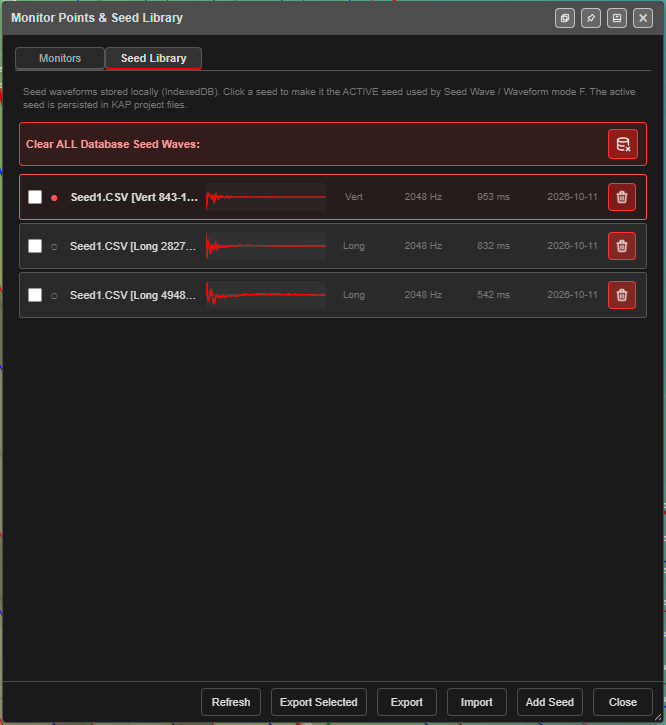
Each row shows a tick, ● for the active seed, the name (file, axis and clip window), a small trace, the axis, sample rate, duration and date, and a trash button.
| Button | What it does |
|---|---|
| Add Seed | Loads a trace — see Add a seed |
| Import | Merges a seed library ZIP into this one |
| Export | Saves the whole library as a ZIP |
| Export Selected | Saves only the ticked seeds |
| Refresh | Reloads the library |
Click a row to make that seed active. Clear ALL Database Seed Waves: deletes every seed.
Add a seed
- Click Add Seed and choose the file.
- A two-column CSV (time in ms, velocity) or a one-column TXT (read at 1000 Hz) is added straight away.
- A full-waveform export from an Instantel or Texcel monitor opens Clip Seed Waveform.
- In Clip Seed Waveform, choose the Seed axis: — Long (Longitudinal / radial), Tran (Transverse) or Vert (Vertical).
- Choose the Mode: — see below.
- Click Commit as Seed. The seed is added to the library, named after the file, the axis and the window. Cancel adds nothing.
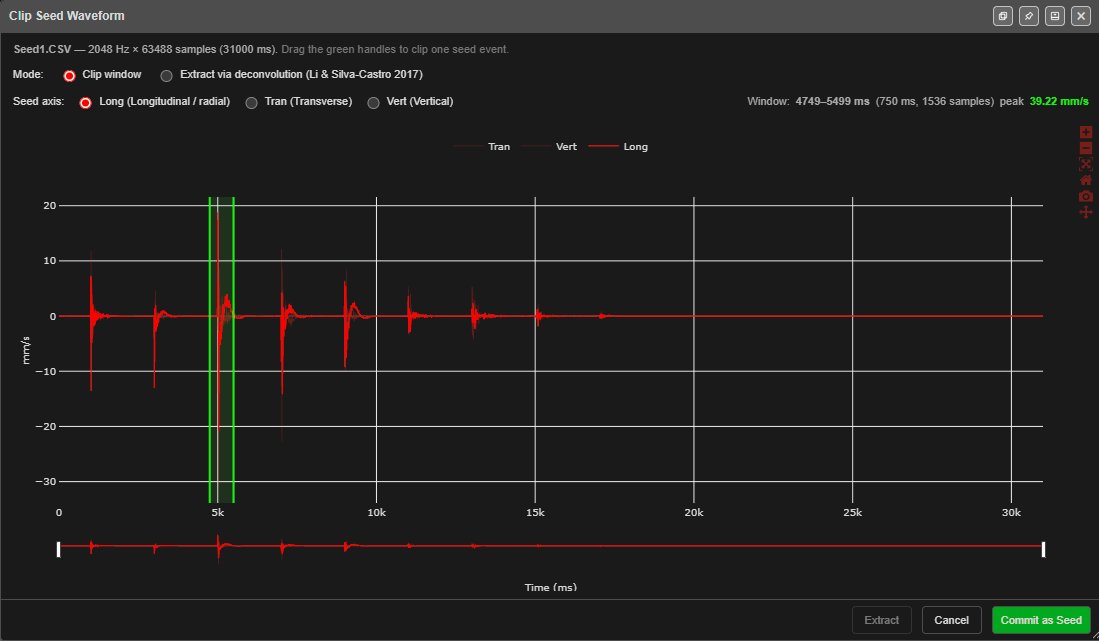
Clip window — “Drag the green handles to clip one seed event.” Pick one clean hole event. The readout shows the window, its length and its peak, for example Window: 4749–5499 ms (750 ms, 1536 samples) peak 39.22 mm/s. The strip under the chart pans and zooms along the record.
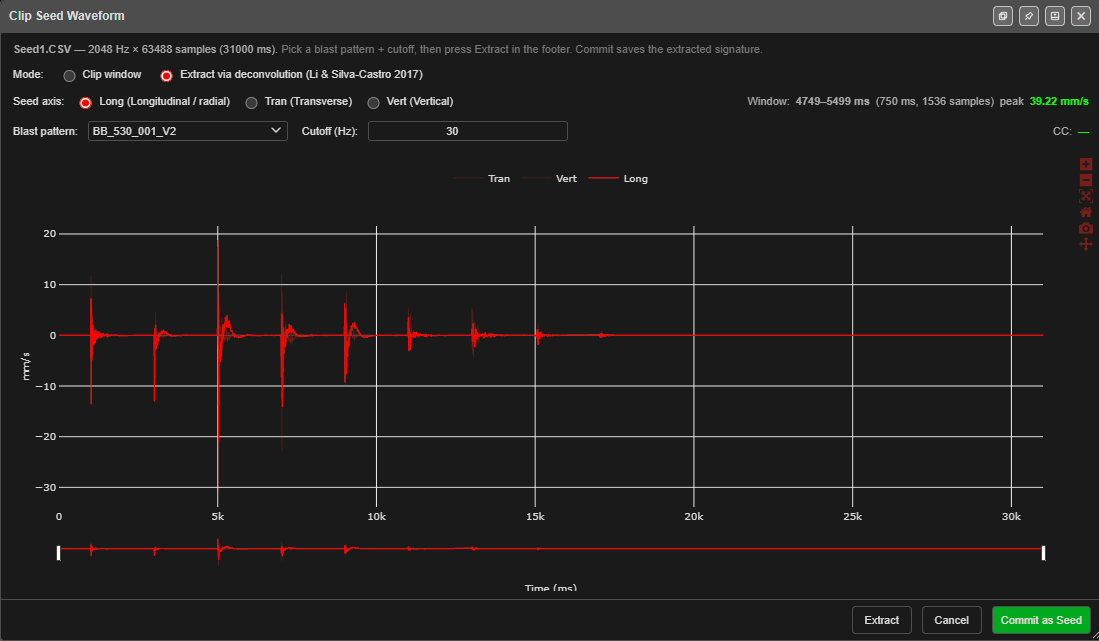
Extract via deconvolution (Li & Silva-Castro 2017) — “Pick a blast pattern + cutoff, then press Extract in the footer. Commit saves the extracted signature.” Instead of clipping one event, Kirra works out the single-hole signature from the whole record, using the chosen blast’s deck firing times and charges. Choose the Blast pattern that was recorded and a Cutoff (Hz) (default 30 — “works for most blast spectra”; set well below the trace’s main frequency it strips out the signature itself), then click Extract, then Commit as Seed. A CC value shows after extraction.
On the canvas
In any PPV Voronoi mode, each enabled monitor is drawn with a marker, a line to the hole that governs it, its distance, and its result. Monitors are not printed.
What is remembered
Monitors are kept with the workspace and in this browser, and travel in KAP projects. Seeds are kept in this browser; the active seed travels in KAP projects.
Troubleshooting
A monitor shows No charging data. The blast has no charging yet. Assign charging to the holes.
Import says CSV missing required columns (Name, X, Y). The header row must name Name, X and Y exactly.
My Love wave settings were lost after a CSV round trip. The CSV does not carry them — export as a ZIP with seeds, or use a KAP project.