kirra-docs
Voronoi Cells
A Voronoi cell is the patch of ground closer to one hole than to any other. Kirra draws a cell around every hole and colours it by a value — powder factor, mass, firing time, SDoB, predicted vibration and more — so you can see at a glance where a pattern is heavy, light, late or risky.
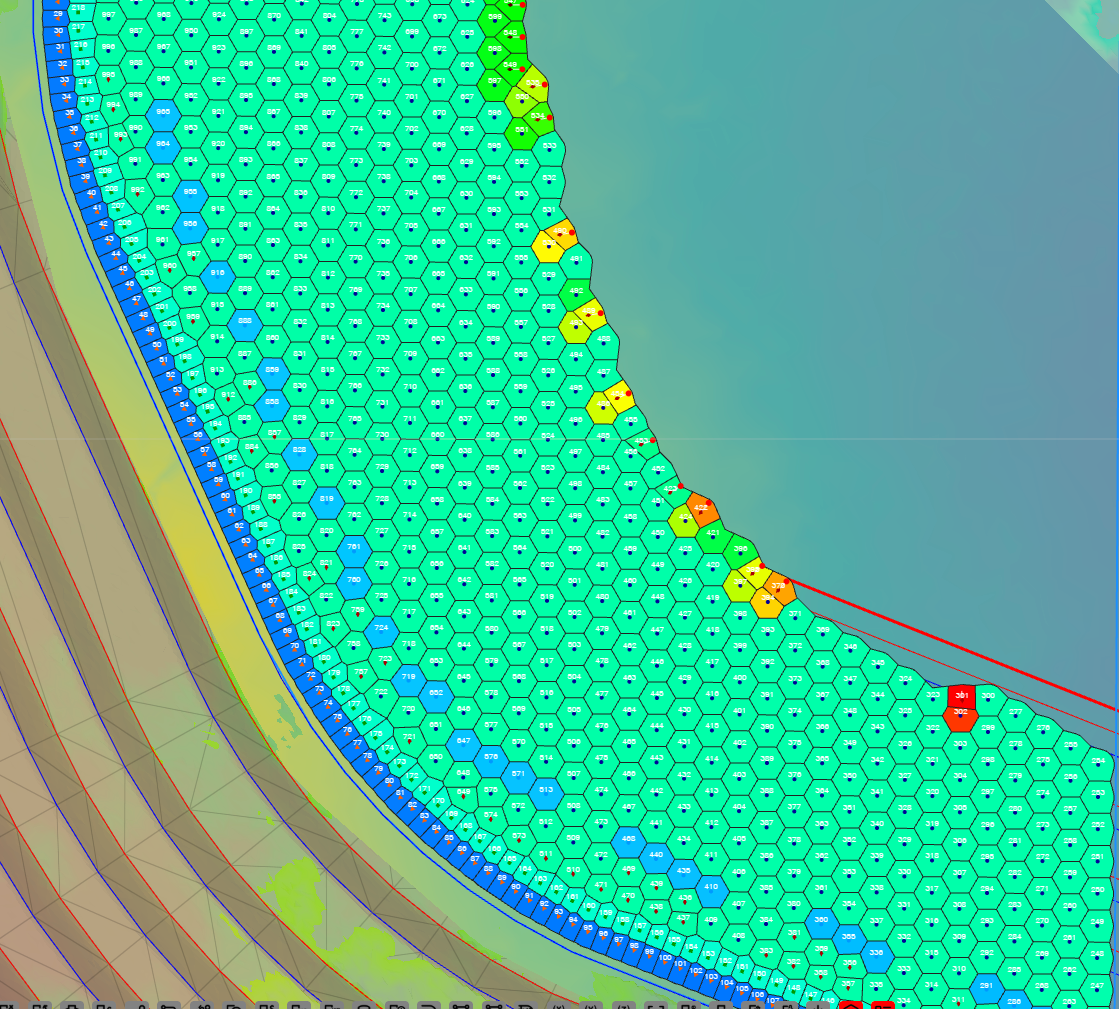 PF - Designed, Min-Max legend. Light-blue cells are holes with less explosive for their
ground; yellow to red are the heaviest.
PF - Designed, Min-Max legend. Light-blue cells are holes with less explosive for their
ground; yellow to red are the heaviest.
Prerequisites
- A blast loaded, with visible holes.
- For powder factor and mass: charging, or a mass on each hole. For measured values: measured mass or length recorded — see Record Actuals.
- For the vibration (PPV) choices: at least one monitor — see PPV Voronoi Modes.
Show the cells
- On the display toolbar, switch on Voronoi (the hexagon with a V).
- Kirra draws the cells and a colour legend at the top of the legend panel.
- To choose what the cells show, right-click Voronoi, or click Voronoi Options on the Analyse toolbar.
Note: Voronoi Options only sets the cells up. It does not switch them on — use the Voronoi display button for that.
The Voronoi Options dialog
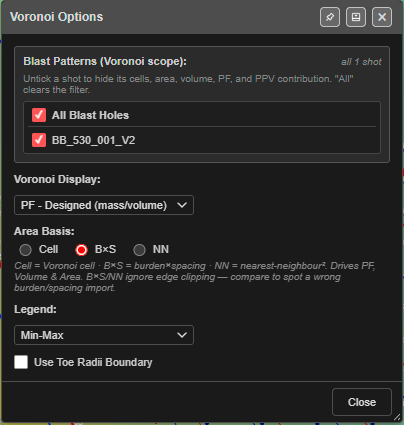
Every change applies straight away — there is no Apply button. Close shuts the dialog. The pin in the title bar (Dock to edge) docks it to the side of the window.
Blast Patterns (Voronoi scope)
A tick list of the blasts loaded. “Untick a shot to hide its cells, area, volume, PF, and PPV contribution. “All” clears the filter.” The counter on the right reads, for example, all 1 shot or 3 of 10 shots.
- All Blast Holes ticked: every blast is included.
- Untick a blast to leave it out of the cells and of every value, including vibration.
- Hidden holes are always left out, whatever is ticked here.
Kirra remembers the ticks in this browser.
Voronoi Display
What each cell is coloured by. The default is PF - Designed (mass/volume).
| Voronoi Display | Each cell shows | Unit |
|---|---|---|
| PF - Measured (mass/volume) | Measured mass ÷ (cell area × hole length). Holes with no measured mass have no value | kg/m³ |
| PF - Designed (mass/volume) | Designed mass ÷ (cell area × bench height; hole length if there is no bench height) | kg/m³ |
| Measured Mass | The hole’s measured mass | kg |
| Designed Mass | The hole’s designed mass | kg |
| Volume | Cell area × hole length | m³ |
| Area | The cell’s area (see Area Basis) | m² |
| Measured Length | The hole’s measured length | m |
| Designed Length | The hole’s design length, collar to toe | m |
| Hole Firing Time | When the hole’s first charge fires — surface plus downhole delay, or the electronic delay | ms |
| Scaled Depth of Burial | Stemming plus half the contributing charge, divided by the cube root of that charge’s mass. A hole with no charging uses 30 % stemming and 70 % charge | m/kg^1/3 |
| Stemming Length | Total length of inert decks. Holes with no charging have no value | m |
| PPV — Max / Coherent Seed (mode A) | Predicted peak vibration at the cell | mm/s |
| PPV — Dominant Hole (mode B) | How this hole compares with the worst hole at the governing monitor | 0–1 |
| PPV — Compliance (mode C) | This hole’s predicted vibration ÷ the monitor’s target, worst monitor | ratio |
| PPV — Max Allowable Charge (mode D) | The most charge this hole could fire and keep every monitor under target | kg |
| PPV — Full Forward Array (mode E) | Full wave synthesis, worst monitor | mm/s |
| PPV — Probability of Exceedance (mode F) | Chance of exceeding the target, worst monitor | % |
The six PPV modes add more settings to the dialog — see PPV choices below and PPV Voronoi Modes.
Area Basis
Shown for PF - Measured, PF - Designed, Volume and Area. It sets which area the value is worked out from.
| Option | Area used |
|---|---|
| Cell | The Voronoi cell (trimmed at the blast edge) |
| B×S | The hole’s burden × spacing |
| NN | The distance to the nearest hole, squared |
Tip: From the dialog: “B×S/NN ignore edge clipping — compare to spot a wrong burden/spacing import.” If Cell and B×S give very different powder factors, the burden and spacing on the holes are probably wrong.
Kirra remembers the choice, and it travels in a KAP project.
Legend
| Option | Colour range |
|---|---|
| Min-Max (default) | Stretched from the lowest to the highest value in the cells. Powder factor, Max PPV and Mode E start at 0 |
| Fixed | A set range, so two blasts can be compared by colour |
Fixed ranges:
| Display | Fixed range |
|---|---|
| PF - Measured, PF - Designed, Scaled Depth of Burial | 0 – 3 |
| Measured Mass, Designed Mass | 0 – 1000 kg |
| Volume | 0 – 5000 m³ |
| Area | 0 – 500 m² |
| Measured Length, Designed Length | 0 – 50 m |
| Stemming Length | 0 – 10 m |
| Hole Firing Time | 0 – 5000 ms |
| PPV — Max (A), Full Forward Array (E) | 0 – 200 mm/s |
| PPV — Max Allowable Charge (D) | 0 – 500 kg |
Modes B, C and F always use their own scales (0–1, the compliance bands, and probability bands).
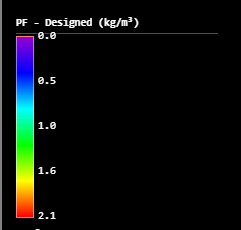
Use Toe Radii Boundary
Off by default. When on, the cells are built around the hole toes instead of the collars. Use it for angled holes, where the toes are where the explosive works.
PPV choices
Choosing a PPV — display adds Global Blast-Side Settings, a Monitor Points (summary) list and a How to read this legend panel to the dialog.
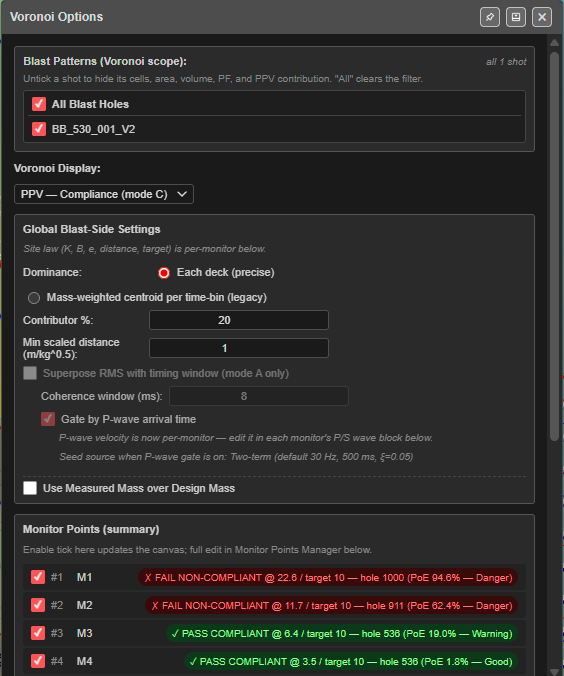
- Mode A works without a monitor. Modes B to F need at least one enabled monitor — without one their cells have no value.
- Each monitor row shows its result, for example ✓ PASS COMPLIANT @ 6.4 / target 10 — hole 536 (PoE 19.0% — Warning). Untick a monitor to leave it out. The button beside Full editor: opens the Monitor Points Manager.
- How to read this legend explains the colours for the mode you are in.
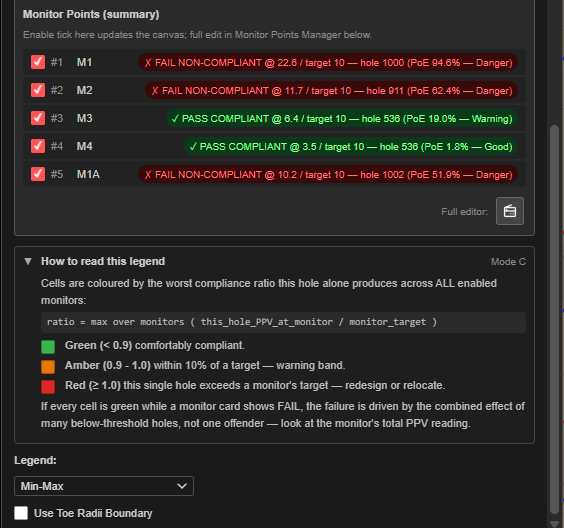
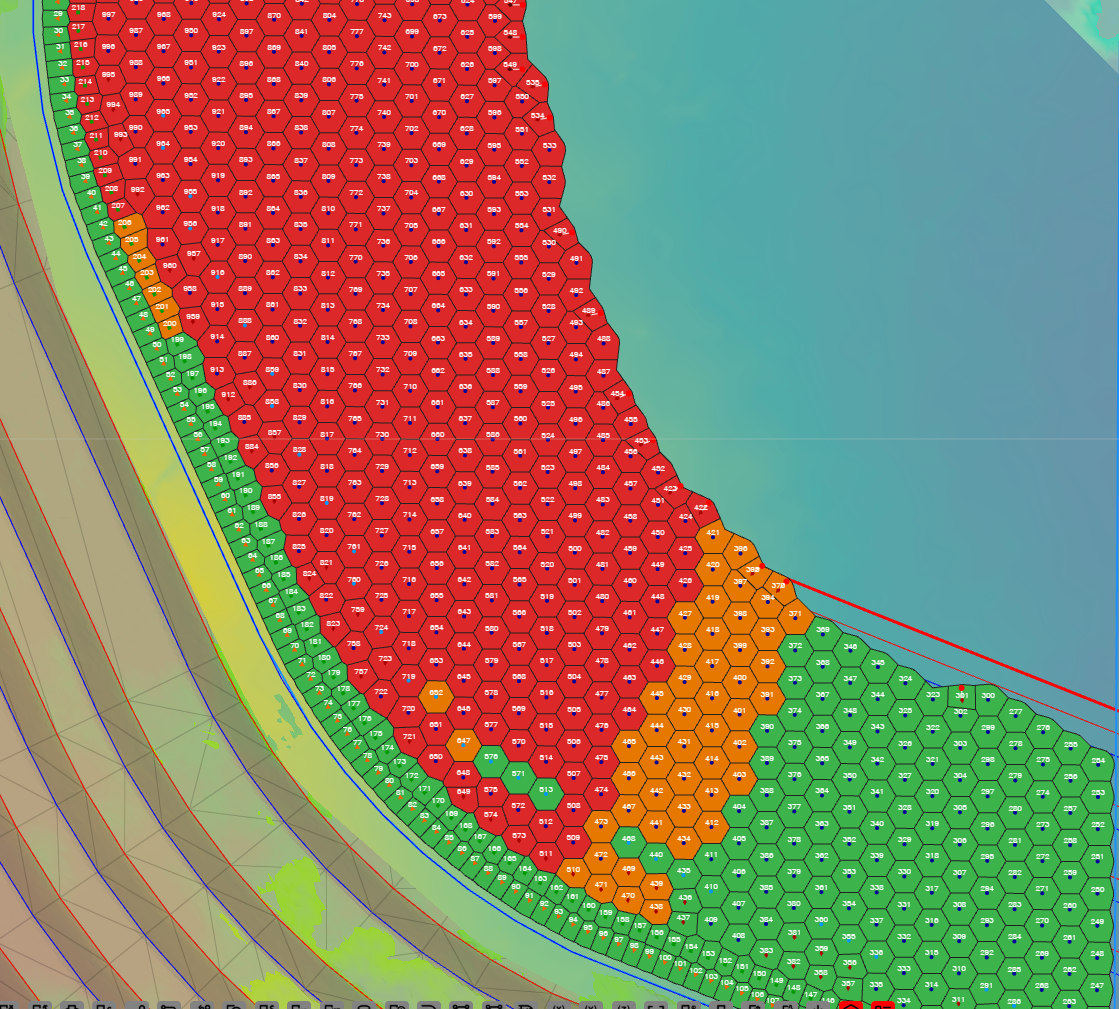 Mode C. Green holes are comfortably under every monitor’s target, amber are within 10 %,
red exceed a target on their own.
Mode C. Green holes are comfortably under every monitor’s target, amber are within 10 %,
red exceed a target on their own.
Every setting in the PPV section is explained in PPV Voronoi Modes.
How the cells are built
- Each visible hole in the ticked blasts gets one cell, around its collar (or toe — see Use Toe Radii Boundary).
- Cells at the edge of the blast are trimmed so they do not run off into open ground. The trim line sits about half a hole spacing outside the outer holes. There is no option to trim to a drawing or a surface.
- With Area Basis set to Cell, area, volume and powder factor use the trimmed cell.
Colours
| Display | Colours, low to high |
|---|---|
| Powder factor | Violet → blue → cyan → green → yellow → red |
| Mass, volume, area, lengths, PPV (A, D, E) | Blue → cyan → green → yellow → red |
| Hole Firing Time | Lime (early) → red (late) |
| Scaled Depth of Burial | Red (shallow — flyrock risk) → orange → lime → cyan → blue (deep) |
| PPV — Dominant Hole (B) | Red (this hole is the worst) → yellow → blue (negligible) |
| PPV — Compliance (C) | Green under 0.9 × target, amber 0.9–1.0, red 1.0 and over |
| PPV — Probability of Exceedance (F) | Blue under 1 %, green 1–5 %, yellow 5–10 %, amber 10–25 %, red 25 % and over |
Cells with no value
A hole with nothing to show — no measured mass for PF - Measured, no charging for Stemming Length, no enabled monitor for a PPV mode — draws as a faint cell with a dashed grey outline. In 3D it is an outline only.
When some cells have no value, a banner appears on the canvas: “No data: … — click for details”. Click it to open Voronoi — No-Data Diagnosis, which lists each reason (for example No charging record, Measured mass is zero, No PPV monitors enabled), how many holes it affects, and a suggested fix.
Spacing QC
If the burden × spacing stored on the holes is more than 20 % away from the actual cell areas, a second banner reads “Spacing QC: design B×S … is …% off the actual cell area … — burden/spacing may be wrong”. Click it for the holes concerned, or × to dismiss it. It returns if the flagged holes change.
In 3D and in print
- 3D: each cell is a thin coloured slab just under the collar (or just above the toe), with the same colours and legend as 2D.
- Print: the raster, vector and template plots colour the cells exactly as the screen does,
with the same legend range. A template can ask for a particular display with the
vor.codes — see Voronoi Metric Codes. A map without avor.code prints the display chosen on screen. - PPV monitors (the crosshairs and lines) are not printed.
What is remembered
| Setting | Remembered? |
|---|---|
| Blast Patterns ticks | In this browser |
| Area Basis | In this browser, and in KAP projects |
| Voronoi Display, Legend, Use Toe Radii Boundary | No — after a reload the display is PF - Designed |
| PPV settings and monitors | In this browser, and in KAP projects |
Troubleshooting
The cells are all one colour. Every hole has the same value — for example identical charging. Try Fixed to compare against the normal range, or choose another display.
Powder factor is missing on some holes. PF - Measured needs a measured mass; PF - Designed needs a designed mass. Click the No data banner to see which holes and why.
The powder factor looks wrong across the whole blast. Switch Area Basis between Cell and B×S. A large difference, or the Spacing QC banner, points to wrong burden and spacing on the holes.
A PPV mode shows dashed cells everywhere. Modes B to F need an enabled monitor. Add or tick one in the Monitor Points Manager.
Voronoi Options is open but no cells are drawn. Switch on the Voronoi display button.
Related
- PPV Voronoi Modes — modes A to F in detail
- Display Options
- Analyse Toolbar
- PDF Printing — Voronoi Metric Codes