kirra-docs
Display Options
The row of buttons along the bottom of the window chooses what Kirra draws on and around each hole — IDs, lengths, angles, times, charges, timing contours and more. Each button is an on/off switch, and most have extra settings on a right-click.
 The display toolbar. A red button is on; grey is off. Hover over any button for its name.
Turn a label on or off
- Find the button along the bottom of the window (hover to see its name).
- Click it. The button turns red and the labels appear on every visible hole.
- Click it again to turn the labels off.
Labels show in both the 2D and 3D views.
Tip: Many labels at once soon clutter a dense pattern. Turn on only what you need for the task, and use Hide in the Data Explorer to show one blast at a time.
The buttons
In order, left to right:
| # | Button | Shows |
|---|---|---|
| 1 | Hole ID | The hole’s ID. On by default |
| 2 | Hole Length | Collar-to-toe length |
| 3 | Hole Diameter | Diameter (mm) |
| 4 | Hole Angle | Angle from vertical (0° = vertical) |
| 5 | Hole Dip | Dip, or mast angle (90° = vertical) |
| 6 | Hole Bearing | Bearing (0° = north, clockwise) |
| 7 | Hole Subdrill | Subdrill |
| 8 | Ties | Surface ties (connectors) between holes |
| 9 | Channel Colours | Draws ties in their harness channel colour, with each hole’s sequence number and harness ID — see Harness Wire Assignment |
| 10 | Delay Value | The tie delay into each hole (ms) |
| 11 | Hole Time | Firing time (ms) |
| 12 | Stemming Length | Length of the inert decks (right-click to choose which — see below) |
| 13 | Mass Per Hole | Explosive mass in the hole |
| 14 | Mass Per Deck | Explosive mass in each deck |
| 15 | Charges | The charge decks down each hole |
| 16 | Downhole Timing | Deck timing labels (right-click to choose which — see below) |
| 17 | Contours | Timing contours — lines of equal firing time |
| 18 | Slope | The timing gradient over the pattern |
| 19 | Relief | Burden relief — how much has moved before each hole fires |
| 20 | First Movement | Arrows showing which way each area moves |
| 21 | Hole X Location | Collar easting |
| 22 | Hole Y Location | Collar northing |
| 23 | Hole Z Location | Collar elevation |
| 24 | Row and Position | Row and position IDs, or burden and spacing (right-click to choose) |
| 25 | Hole Type | Hole type (Production, Presplit …) |
| 26 | Measured Length | The recorded as-drilled length — see Record Actuals |
| 27 | Measured Mass | The recorded as-charged mass |
| 28 | Comment | The recorded comment |
| 29 | KAD Point IDs | The point number at each vertex of KAD drawings |
| 30 | Voronoi | Voronoi cells around the holes (right-click opens Voronoi Options) |
| 31 | Legend | The colour legend for the active display, including point clouds coloured by elevation. On by default |
Contours, Slope, Relief and First Movement are explained in Timing Contours, First Movement and Relief. Voronoi cells are explained in Voronoi Cells.
Right-click a button to adjust it
Right-click a button to open a small popover beside it. The change applies straight away; close the popover with its ×.
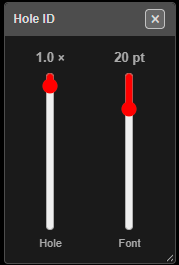 Right-clicking Hole ID opens sliders for the hole symbol size and the label font size.
| Right-click on | Popover | Controls |
|---|---|---|
| Hole ID | Hole ID | Hole — size of the hole symbol (0.5–20 ×); Font — label size (1–100 pt) |
| Hole Length | Length | Toe — radius of the toe circle (0–30 m); Font |
| Ties | Tie Size | Tie — size of the tie arrows |
| First Movement | First Move | Size of the arrows, and their colour |
| Contours | Contour | ms — the contour interval (5–1,000 ms), plus the contour display and label options described in Timing Contours |
| Hole Diameter, Hole Angle, Hole Dip, Hole Bearing, Hole Subdrill, Delay Value, Hole Time, Hole X / Y / Z Location, Hole Type, Measured Length, Measured Mass, Comment, KAD Point IDs | Font Size | Font — every text label shares this one size |
The Snap button in the top bar has a popover too — see Selection & Snapping.
Buttons with a menu instead
Some buttons offer a choice rather than a slider. Pick an entry to set what the label shows.
| Right-click on | Choices |
|---|---|
| Stemming Length | All, Stemming, Air, Water, StemGel, DrillCuttings — which inert deck types the label adds up |
| Row and Position | Row and Pos (the IDs) or Burden and Spacing (the values) |
| Downhole Timing | Downhole Deck Time, Load/Primer Offsets, Timing/Function Offsets, Deck Time and Primer, Deck Time and Timing |
| Mass Per Hole / Mass Per Deck | Include primer / booster mass or Exclude primer / booster mass |
| Voronoi | Opens the Voronoi Options dialog |
The same sizes can also be set on the 2D tab of the Settings dialog.
Troubleshooting
A label is switched on but nothing shows. The hole has no value for it yet. Mass, charges and stemming need the hole to be charged; times need ties; Measured Length / Mass / Comment need recorded actuals.
Labels overlap and can’t be read. Lower the font with a right-click on any text button, or turn off labels you don’t need.
The labels are on but a blast is missing. That blast is hidden. Show it from the Data Explorer.
Related
- Timing Contours, First Movement and Relief
- Settings — default sizes on the 2D tab
- Printing