kirra-docs
Settings
This page covers the theme, the language, and the Settings dialog — label sizes, snap tolerance, camera and lighting, and performance limits.
Theme (light or dark)
Click Toggle Dark Mode — the sun / moon button at the end of the top bar. Kirra switches straight away and remembers the choice in this browser.
Language
Choose a language from Select Language in the top bar, or from the Language group in the side panel (☰).
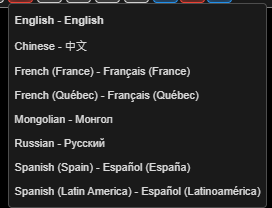
Kirra switches straight away and remembers the choice. Blasting terms are translated as blasting terms, not word for word — see the Blasting Glossary. Parts of Kirra not yet translated show in English.
The Settings dialog
Open Settings with the 3D Settings button — the globe-and-cog at the bottom of the Select toolbar. It opens on the 3D tab.
| Tab | When changes apply |
|---|---|
| 2D | Straight away, as you change each value. Cancel does not undo them |
| 3D | When you click Save |
| Performance | When you click Save |
2D tab
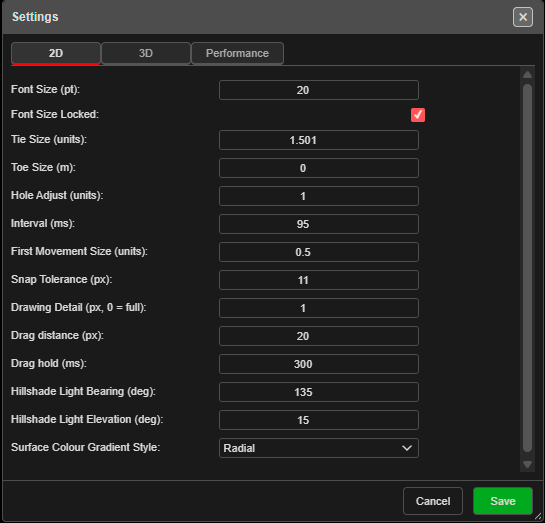
| Setting | Default | What it does |
|---|---|---|
| Font Size (pt) | 14 | Size of labels on the canvas |
| Font Size Locked | On | On: labels stay the same size on screen as you zoom. Off: labels grow and shrink with the zoom (2D only) |
| Tie Size (units) | 3 | Size of the tie arrows |
| Toe Size (m) | 0 | Radius of the circle drawn at each toe |
| Hole Adjust (units) | 2 | Enlarges the hole symbols — at the default they are drawn at twice their true size |
| Interval (ms) | 100 | Interval between timing contours |
| First Movement Size (units) | 2 | Size of the first-movement arrows |
| Snap Tolerance (px) | 15 | How close, in screen pixels, the cursor must be to snap |
| Drawing Detail (px, 0 = full) | 1 | In 2D, skips line vertices closer together than this on screen. 0 draws every vertex |
| Drag distance (px) | 5 | How far a press must move before it counts as a drag rather than a click |
| Drag hold (ms) | 300 | Not used by current versions |
| Hillshade Light Bearing (deg) | 135 | Direction of the light on hillshaded surfaces |
| Hillshade Light Elevation (deg) | 15 | Height of that light above the horizon |
| Surface Colour Gradient Style | Radial | Radial, Default or Baycentric |
Several of these are also on right-click popovers of the display buttons.
3D tab
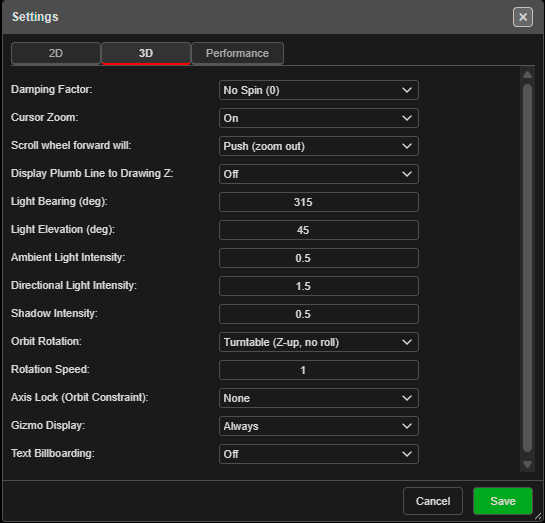
| Setting | Default | What it does |
|---|---|---|
| Damping Factor | No Spin (0) | How long the view keeps turning after an orbit — No Spin (0), Low (0.3), Medium (0.5), High (0.7), Max Spin (1) |
| Cursor Zoom | On | On zooms towards the cursor; Off zooms towards the centre of the view |
| Scroll wheel forward will | Push (zoom in) | Push (zoom in) or Push (zoom out) |
| Display Plumb Line to Drawing Z | Off | Draws a vertical line from the cursor to the drawing elevation |
| Light Bearing (deg) | 135 | Direction of the main light (0 = north, clockwise) |
| Light Elevation (deg) | 15 | Height of the main light above the horizon |
| Ambient Light Intensity | 0.8 | Strength of the even, all-round light |
| Directional Light Intensity | 2.5 | Strength of the main light |
| Shadow Intensity | 0.5 | Strength of shading. 0 turns it off |
| Orbit Rotation | Turntable (Z-up, no roll) | Turntable keeps the horizon level; Trackball (grab point) turns about the point you grab; Legacy (mouse delta) is the older behaviour |
| Rotation Speed | 1 | How fast a drag orbits (−5 to 5). A negative value reverses the direction |
| Axis Lock (Orbit Constraint) | None | Limits orbiting to one motion — None, Pitch (tilt up/down), Bearing (swing around), Spin (about view axis) |
| Gizmo Display | Only When Orbit or Rotate | When to show the axis gizmo — Always, Only When Orbit or Rotate, Never |
| Text Billboarding | Off | Turns text to face the camera — Off, On (Holes), On (KAD), On (All) |
The screenshots show one user’s values, not the defaults.
Performance tab
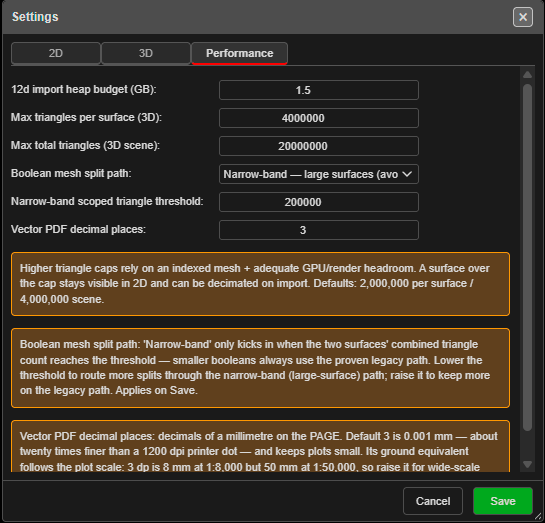
| Setting | Default | What it does |
|---|---|---|
| 12d import heap budget (GB) | 1.5 | Memory allowed when importing large 12d Archive files |
| Max triangles per surface (3D) | 2,000,000 | A surface with more triangles is not drawn in 3D. It still shows in 2D, and can be reduced on import |
| Max total triangles (3D scene) | 4,000,000 | Limit for all surfaces drawn in 3D together |
| Max Point-Cloud Points | 30,000,000 | The most points Kirra reads and draws for a point cloud. It uses about 24 bytes of memory a point, so 30,000,000 points is roughly 720 MB. Lower it on a low-memory machine |
| Boolean mesh split path | Narrow-band | Narrow-band — large surfaces (avoids running out of memory) or Legacy — full mesh (small surfaces) |
| Narrow-band scoped triangle threshold | 200,000 | Booleans on fewer triangles than this always use the legacy path |
| Vector PDF decimal places | 3 | Decimals of a millimetre on the page in vector PDF plots. Raise it for large-scale plots that will be measured; files get bigger |
Higher triangle limits need a capable graphics card.
Where settings are kept
Settings belong to this browser on this computer, not to a workspace — every workspace in this browser uses the same settings.
Most of them also travel inside a KAP project, so a colleague who opens your project sees your label sizes and 3D setup. Snap Tolerance, Drag distance and Drag hold stay on your computer.
Troubleshooting
Labels are tiny / huge. Change Font Size (pt) on the 2D tab, or right-click any text display button.
The scroll wheel zooms the wrong way. Change Scroll wheel forward will on the 3D tab and click Save.
A big surface shows in 2D but not in 3D. It has more triangles than Max triangles per surface (3D). Raise the limit on the Performance tab, or reduce the surface when importing it.