kirra-docs
Coincident Holes Check
Finds holes in one blast that sit too close to another blast’s holes, or to a drawing, and can move them clear. Use it before drilling a new bench over an old shot, or to keep holes out of a no-drill zone.
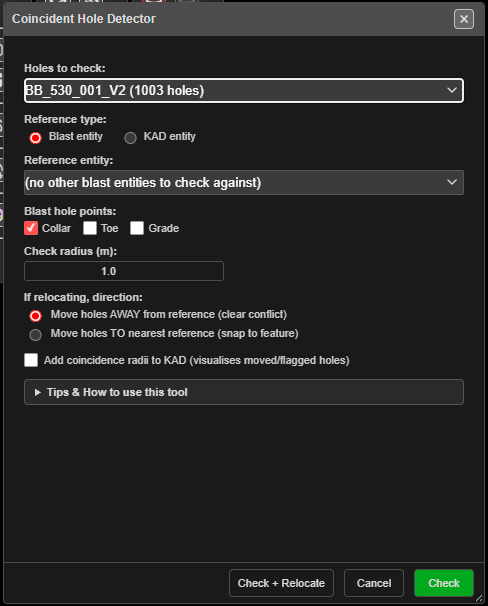 The Coincident Hole Detector. Check reports conflicts; Check + Relocate also moves the holes.
Prerequisites
- At least one visible blast. Without one, Kirra says “No visible blast holes are loaded. Add a pattern or load a project before running the coincident-hole check.”
- A reference: a second visible blast, or a visible KAD drawing.
Check a blast
- Click Coincident Holes Check on the Holes toolbar. The Coincident Hole Detector opens.
- In Holes to check: pick the blast whose holes may be flagged or moved.
- Set Reference type: to Blast entity or KAD entity, then pick the Reference entity:.
- Set Check radius (m):.
- Click Check. The dialog closes and a result window lists every hole within the radius of a reference point, worst first, with the distance to it.
To move the flagged holes as well, choose a direction under If relocating, direction: and click Check + Relocate instead.
The options
| Option | Default | What it does |
|---|---|---|
| Holes to check: | First blast | The blast whose holes are tested — and moved, with Check + Relocate. Lists visible blasts with their hole counts |
| Reference type: | Blast entity | Test against another blast’s holes, or a KAD entity’s vertices |
| Reference entity: | First in the list | The blast or drawing to test against. The blast being checked is not offered |
| Blast hole points: | Collar | Blast reference only. Which points of the reference holes count: Collar, Toe, Grade. Tick Toe to catch an angled hole whose collar is clear but which would drill into an old toe |
| Check radius (m): | 1.0 | A hole closer than this to a reference point is flagged |
| If relocating, direction: | Move holes AWAY from reference (clear conflict) | Or Move holes TO nearest reference (snap to feature). Used only by Check + Relocate |
| Add coincidence radii to KAD (visualises moved/flagged holes) | Off | Draws a ring of the check radius around each affected hole |
What counts as a reference point:
- Blast reference — each hole’s collar, plus its toe and grade if ticked. Unticking all three tests collars.
- KAD reference — every vertex of a line or polygon, a circle’s centre, a text’s anchor, a point itself.
The holes being checked are always tested at their collar.
The dialog’s Tips & How to use this tool section explains each option in the app.
What you get
Check reports without changing anything: how many holes were tested, how many reference points, the radius, and each flagged hole paired with its nearest reference point.
Check + Relocate moves the flagged holes, then reports the moves:
- Move holes AWAY pushes each hole just past the radius, directly away from its nearest reference point. If that lands it inside another point’s radius, it tries again — up to three times.
- Move holes TO puts each hole’s collar on its nearest reference point.
- Each moved hole keeps its angle, bearing, length and collar elevation. Its toe and grade move with it.
- A hole that cannot be cleared is blocked: it is put back where it was and listed, with the reference points in the way. Move it by hand.
- All the moves are one step for Ctrl+Z.
With Add coincidence radii ticked, the rings go into a new drawing on the Boundaries layer, Coincidence sub-layer, named after the blast and the radius. Check rings the flagged holes; Check + Relocate rings the moved holes at their new positions. Blocked holes get no ring. The rings are not part of the undo — delete the drawing in the Data Explorer if you do not want it.
Other ways to use it
| Method | Result |
|---|---|
| Adding, inserting or moving a hole | Every hole tool already checks for a hole on top of another in the same blast, and warns before placing it. This tool checks between blasts and drawings |
| Reference type: KAD entity with a no-drill polygon | Move holes AWAY clears holes off the polygon’s vertices. Only the vertices are tested, not the area inside |
| Move holes TO a set of surveyed points | Snaps designed holes onto surveyed collar positions |
Troubleshooting
| Problem | Cause and fix |
|---|---|
| “No Reference Entity” | No other visible blast or drawing to test against. Show one in the Data Explorer |
| “Invalid Radius” | Check radius (m): must be greater than 0 |
| A hole on top of an old toe was not flagged | Only collars of the reference were tested. Tick Toe under Blast hole points: |
| A hole inside a polygon was not flagged | A KAD reference tests distance to its vertices, not whether a hole is inside the shape |
| Holes were listed as blocked | Reference points crowd the hole on several sides, so no move clears them all. Move it by hand |
| “No coincident holes found within … m. Nothing to relocate.” | Nothing is inside the radius — no change was made |
Related
- Editing Holes → Hole coincidence — the same-blast check every hole tool runs
- Convert Holes to KAD Points — turn an old shot’s toes into a drawing
- Holes Toolbar