kirra-docs
Convert Holes to KAD Points
Creates a KAD point at the collar, grade or toe of each selected hole. Use it to carry hole positions into drawing tools — triangulate a toe surface, offset a crest line, check a new bench against old toes — or to export them as drawing geometry.
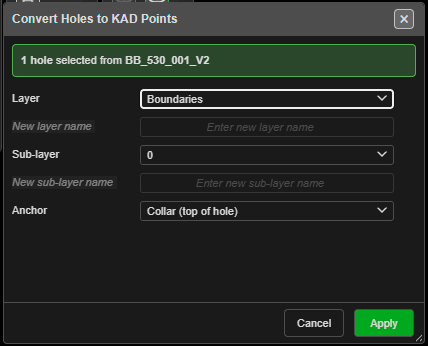 Convert Holes to KAD Points, with one hole selected.
Prerequisites
- One or more holes selected. Without a selection, Kirra says “Select one or more visible blast holes before converting to points.”
- Hidden and locked holes in the selection are skipped.
Convert holes to points
- Select the holes.
- Click Convert Holes to KAD Points (collar / grade / toe) on the Holes toolbar. The banner at the top says how many holes are selected, and from which blast.
- Choose the Layer and Sub-layer for the new points.
- Choose the Anchor.
- Click Apply. The status bar reports “Created … point(s) in … entity”.
The options
| Option | Default | What it does |
|---|---|---|
| Layer | Your last choice, else the first layer (or + New Layer… when there are none) | The drawing layer for the points. + New Layer… enables New layer name |
| New layer name | — | Name for a new layer. A layer of that name already present is used instead of making a second |
| Sub-layer | Your last choice, else 0 | The folder inside the layer. + New File Layer… enables New sub-layer name |
| New sub-layer name | — | Name for a new sub-layer |
| Anchor | Collar (top of hole) | Or Grade (floor elevation) or Toe (bottom of hole). Each point takes that position’s X, Y and Z exactly |
The dialog remembers the layer, sub-layer and anchor until Kirra is reloaded. A layer named 0
is not offered.
What you get
- One drawing per blast. A selection spanning three blasts makes three drawings.
- Each drawing is named after its blast and the anchor, such as
BLAST2_Toe_Points. A repeat run gets a new name rather than overwriting. - Each point’s ID is its hole’s number when the hole ID is a whole number (hole
57→ point 57). Holes named with letters (A12,PS-4) — or whose number is already taken — are numbered on after the last point, and the status bar says how many were renumbered. - The points use the KAD Color and Point and Line Size set on the KAD toolbar.
Delete the drawing in the Data Explorer to remove the points — this tool does not add an undo step.
Other ways to use it
| Method | Result |
|---|---|
| Data Explorer → right-click holes or a blast → To Points… | Opens the same dialog for the holes you right-clicked. A blast node converts all its visible holes |
| Anchor: Toe on an old shot, then Coincident Holes Check with KAD entity | Checks a new bench against the old toes as a drawing |
Troubleshooting
| Problem | Cause and fix |
|---|---|
| “Select one or more visible blast holes before converting to points.” | Nothing selected, or every selected hole is hidden or locked |
| “Nothing to Convert” — all holes skipped | The chosen anchor has no coordinates on those holes. Try a different anchor |
| “Layer Name Required” / “Sub-layer Name Required” | + New Layer… or + New File Layer… is chosen but the name is blank |
| Point IDs do not match the hole names | Only whole-number hole IDs can become point IDs. A name such as A12 cannot |