kirra-docs
Initiation Points
Adds or removes an initiation point — the place the blast is lit from. The toolbar button is Self Connect Add IP. Every firing time in a blast is counted from its initiation points, so a blast with none has no times.
Note: In Kirra an initiation point is where the surface sequence starts — a hole, or a point on a cord trunk. It is not the primer position inside a hole.
Add an initiation point to a hole
- Click Self Connect Add IP on the Connect toolbar. The status bar reads “Initiation Point: click a hole to add or remove the point the blast is lit from.”
- Hover a hole — the status bar says what a click will do.
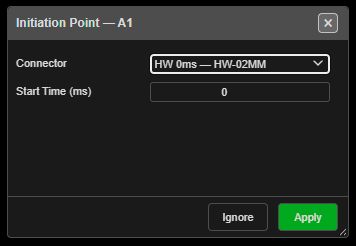
- Click the hole. It becomes an initiation point, and the Initiation Point — … dialog opens.
- Choose a Connector and Start Time (ms) (below), then click Apply — or click Ignore to keep it as it is.
- The tool stays on. Click the button again to finish.
The hole is already an initiation point before the dialog opens, so Ignore does not undo it.
The Initiation Point dialog
| Field | Default | What it does |
|---|---|---|
| Connector | The hole’s current surface product, or — Manual (no product) — | The surface product that lights this point. Picking one fills Start Time (ms) from it |
| Start Time (ms) | The hole’s current delay, or 0 | When this point fires. 0 means the blast starts here |
| Button | Result |
|---|---|
| Apply | Sets the product (its colour and travel time) and the start time. A typed time wins over the product’s delay |
| Ignore | Keeps the initiation point with its current time |
Remove an initiation point
Click a hole that is already an initiation point. The point is removed and the hole is left untied — it is no longer part of the timing.
Warning: Every hole fed from a removed initiation point loses its firing time. The status bar says how many: “… hole(s) downstream now have no signal path.”
The hole’s start time is kept, so adding the point back restores it.
Cord trunks
Click a trunk run away from any collar to light the trunk at that spot. Click the same spot again to remove it.
- “Initiation added to …” / “Initiation removed from …” confirm the change.
- A trunk with no initiation of its own is lit at its start. That default cannot be removed — add a source elsewhere to move it.
- A collar always wins over the trunk: click on the hole to light the hole, anywhere else along the run to light the trunk.
When a cord feeds the hole
Lighting a hole that a cord already feeds keeps the cord: “Initiation point added to … — the cord that fed it was kept as a connection.” For harness wire and surface connectors, the hole’s old tie is replaced.
Troubleshooting
| Symptom | Cause | Fix |
|---|---|---|
| “Nothing under the cursor — click a collar, or a cord run to light it there.” | The click missed both | Click on the collar, or on the trunk line |
| Holes show no time after a click | That click removed an initiation point | Click the hole again to add it back |
| A locked hole will not take a point | Locked holes cannot be picked | Unlock its blast in the Data Explorer |
| “… is lit at its start by default — add a source elsewhere to move it.” | The trunk’s default start cannot be removed | Add an initiation elsewhere on the run |
Other ways to use it
| Method | Result |
|---|---|
| Click a hole twice with Tie Connect or Tie Connect Multi | Makes it an initiation point, with no dialog |
| Click the chain head again with Tie Connect Continuous | Makes it an initiation point and ends the chain |
| Right-click a trunk → Add Initiation / Remove Initiation | The same as clicking the trunk with this tool |
| Data Explorer → right-click holes → Reset Connections | Ties every selected hole to itself with a 0 ms delay — each becomes an initiation point |