kirra-docs
Renumber Holes
Gives a run of holes new hole IDs, row and position numbers, by clicking the first and last hole of the run. Use it to tidy the numbering after editing a pattern, or to name a blast by row (A1, A2 … B1).
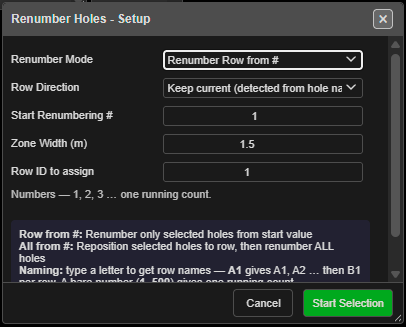 Renumber Holes - Setup. Set the options, then click Start Selection.
Prerequisites
- At least one blast loaded. With no holes, Kirra says “There are no blast holes to renumber.”
- The holes you want renumbered are visible and not locked. Hidden and locked holes are left alone.
Renumber a run of holes
- Click Renumber Holes on the Holes toolbar. The Renumber Holes - Setup dialog opens.
- Set the options (below), then click Start Selection.
- Click the first hole of the run. It turns green, and a stadium-shaped zone follows the cursor to show which holes will be collected.
- Click the last hole of the run. Every hole inside the zone is collected and renumbered straight away, in order of distance from the first hole.
- The status bar reports the result — for example “Renumbered 12 holes in row 3: 1 to 12”.
The tool switches itself off after each run. Click Renumber Holes again for the next one. Press Escape to stop before the second click.
While the tool is on, Row and Position display is switched on so you can see the result. It works in 2D and 3D.
The options
| Option | Default | What it does |
|---|---|---|
| Renumber Mode | Renumber Row from # | Renumber Row from # renumbers only the holes in the zone. Renumber All from # puts the zone’s holes into the row you name, then renumbers every hole in the blast |
| Row Direction | Keep current (detected from hole names) | Used by Renumber All from #. Serpentine (alternate each row) or Forward & Return (same way each row). Keep current reads each row’s direction from its existing names |
| Start Renumbering # | 1 (then your last value) | The first hole ID. It also chooses the naming scheme — see below |
| Zone Width (m) | 1.5 | Width of the collection zone around the line between your two clicks (0.5 to 50) |
| Row ID to assign | 1 | The row number the zone’s holes are given |
The dialog remembers your settings for the session, except Row ID to assign, which starts at 1 each time.
The start value chooses the naming scheme
| You type | You get |
|---|---|
1 or 500 |
Numbers — one running count: 500, 501, 502 … |
A1 or BH1 |
Row names — the letter is the row and the number the position: A1, A2 … then B1 for the next row |
A preview under the field shows what you will get as you type. A value Kirra cannot read — ABC,
A-1, 12A — is refused with “Invalid Start Value” rather than quietly renumbering from 1.
What you get
- Renumber Row from # — the zone’s holes take the IDs from your start value, the Row ID to assign, and position numbers that continue after the last position already in that row.
- Renumber All from # — the zone’s holes join the row you named, then the whole blast is renumbered by walking its rows. Row Direction decides whether alternate rows run back (serpentine) or every row starts at the same end.
- Ties (the “from” hole of each connection), charging, label layouts, timing construct membership and blast groups follow the new IDs — each hole keeps its own label settings.
- Only holes in the same blast as the first hole are collected, even where another blast overlaps the zone.
Warning: Renumbering cannot be undone with Ctrl+Z. Note the current IDs, or export the blast first, if you may want them back.
Other ways to use it
| Method | Result |
|---|---|
| Delete holes, then answer Yes to “Renumber Holes?” | Deletes the holes and renumbers the rest of each affected blast from the Start From value you enter |
| Reorder Rows with Renumber holes after reorder ticked | Re-rows the whole blast from a row line you pick and renumbers it — see Reorder Rows |
| Importing holes whose IDs clash | The Duplicate Resolution dialog offers Renumber to give the clashing holes new IDs |
Troubleshooting
| Problem | Cause and fix |
|---|---|
| “ID Conflict” — “The following IDs already exist in entity …” | Renumber Row from # would reuse IDs held by holes outside the zone. Pick a start value that does not clash, or use Renumber All from # |
| “No holes were collected in the zone.” | The holes between your clicks are hidden, locked, in another blast, or outside the zone. Widen Zone Width (m) |
| A hole beside the run was renumbered too | The zone was too wide and caught the next row. Lower Zone Width (m) below half the burden |
| The status bar says “Please select a different hole as the last hole” | The second click landed on the first hole. Click the other end of the run |
| A serpentine blast came out forward-and-return | Row Direction was set to Forward & Return. Choose Keep current or Serpentine |
Related
- Reorder Rows — rebuild row and position numbers from a row line
- Insert Holes — add holes into a row; the row renumbers itself
- Editing Holes → How hole numbers change when you edit
- Holes Toolbar