kirra-docs
Temporal Mesh
Shows the firing sequence as a surface: every hole with a firing time becomes a corner of a triangle mesh, coloured by time and, in 3D, raised by time. Use it to read the firing front across a whole pattern at a glance.
Before you start
- The blast needs firing times — ties back to an initiation point, or electronic primers with delays. Holes with no time leave a gap in the mesh.
- At least three holes in a blast must have a time for that blast to get a mesh.
Show the mesh
- Click Temporal Mesh on the Connect toolbar. The mesh is built straight away.
- Click Gradient to change its colours, height and transparency (below).
- Click Temporal Mesh again to hide it.
The mesh rebuilds itself whenever timing changes, so it stays in step as you tie holes.
What the mesh shows
| Item | How it is worked out |
|---|---|
| Corners | One per hole, at the collar X and Y |
| Time at a corner | The earliest firing time of the hole’s primers — an electronic primer’s programmed time, or the surface time plus the downhole delay for other primers. An uncharged hole uses its surface time |
| Gaps | A hole charged with no detonator, or with no firing time, cuts a hole-shaped gap in the mesh |
| One mesh per blast | Each blast is meshed on its own, so two blasts never slope into each other |
| Hidden holes | Still shape the surface, but no mesh is drawn over ground you have hidden |
| 2D | Flat triangles coloured by time, with a light wireframe |
| 3D | Raised above the average toe level by 1 m per 50 ms, times Z Magnification |
Gradient dialog
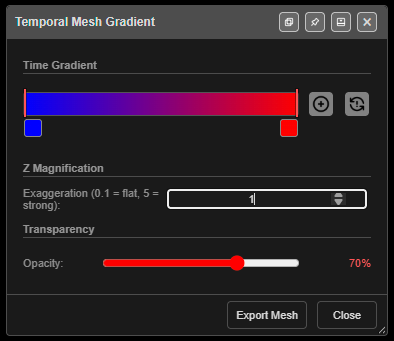
Click Gradient to open Temporal Mesh Gradient. Every change applies live — there is no Apply button.
| Setting | Default | What it does |
|---|---|---|
| Time Gradient | Blue → red | Colour stops along the time range. Drag a middle stop to move it; the first and last stops are fixed at 0% and 100% |
| Add stop button | — | “Add gradient stop (inserts at midpoint of widest gap)” |
| × on a stop | — | Removes a middle stop. At least two stops always remain |
| Reset button | — | Back to blue → red, 70% opacity, Z magnification 1 |
| Z Magnification | 1 | Height exaggeration in 3D, from 0.1 (flat) to 5 (strong) |
| Transparency | 0.7 | Opacity, from 0 (fully transparent) to 1 (fully opaque) |
Click a stop’s colour swatch to pick its colour.
Footer buttons:
- Export Mesh — saves the mesh as
temporal_mesh.dxf: 3D faces on the layerTEMPORAL_MESH, with height as the raw firing time in milliseconds (no exaggeration). - Close — closes the dialog and releases the Gradient button.
What is kept
- The colour stops and transparency are saved with a KAP project.
- Z Magnification is not saved. It goes back to 1 whenever the mesh is switched off.
Troubleshooting
| Symptom | Cause | Fix |
|---|---|---|
| Nothing appears | No hole has a firing time | Tie the blast to an initiation point |
| A hole-shaped gap | That hole has no time, or is charged with no detonator | Tie it in, or add a primer |
| “Nothing to export” on Export Mesh | The mesh has not been built | Switch on Temporal Mesh first |
| The mesh is flat in 3D | Z Magnification is low | Raise it in the Gradient dialog |
Other ways to use it
| Method | Result |
|---|---|
| Temporal Mesh checkbox in the Electronic Timing dialog | Same switch as the toolbar button — the two stay in step |
| Untick the Gradient button | Closes the Gradient dialog |
Related
- Electronic Timing Constructs — per-construct meshes
- Timing Contours
- Time Window Dialog
- Connect Toolbar