kirra-docs
CSV Export
Kirra writes blast holes to CSV in three flavours:
| Flavour | Where | Best for |
|---|---|---|
| Preset BlastHole CSV | Kirra tab → Holes CSV / TXT (preset columns) | Round-trip with another Kirra session or a system that expects a fixed Kirra column layout |
| Measured Data CSV | Kirra tab → Measured Data | Sending as-built / as-loaded data back to a corporate system or back into another Kirra project |
| Custom CSV | Blasts tab → Custom CSV | Matching any downstream system’s column layout — pick fields, units, order, custom headers, custom text columns; supports charging round-trip (v1.0.270+) |
How to Open the Export Dialog
- Open the Left Sidenav (☰ in the App Navigation Bar)
- Under File Management, click Export
The Export dialog is tabbed by file family — identical layout to the Import dialog.
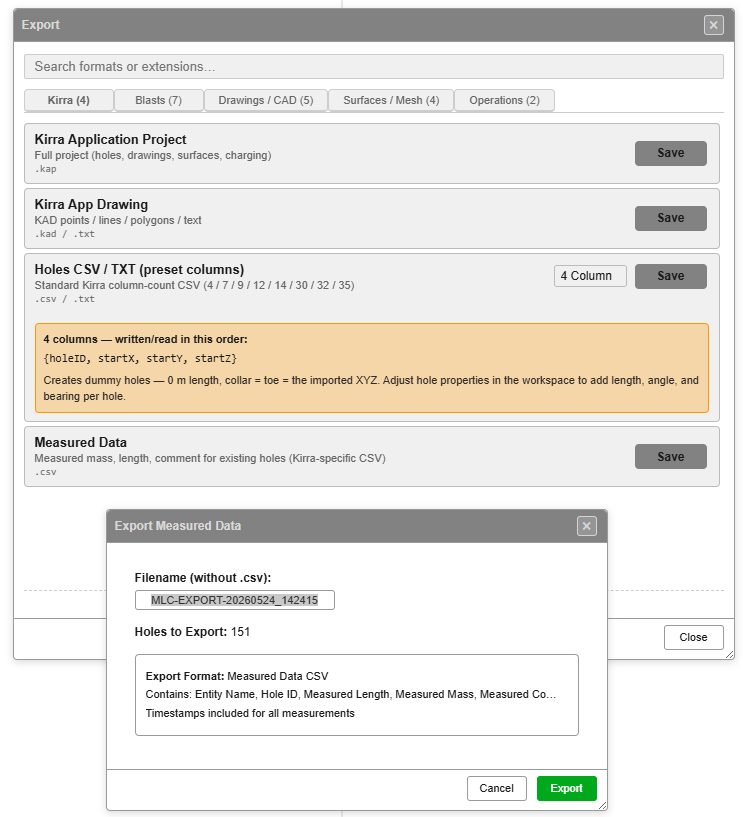 Export dialog on the Kirra tab — KAP, KAD, Holes CSV / TXT (preset columns), Measured Data. The Measured Data confirmation sub-dialog is shown.
| Tab | Counts | What’s on it |
|---|---|---|
| Kirra | 5 | Kirra Application Project, Kirra App Template, Kirra App Drawing, Holes CSV / TXT (preset columns), Measured Data |
| Blasts | 7 | Custom CSV, Charging CSV, CBLAST, Minestar AQM, DetNet ViewShot, DetNet DigiShot / ParVS3, Electronic Timing |
| Drawings / CAD | 5 | Geometry CSV, DXF, Vulcan ARCH_D, Surpac, Micromine STR |
| Surfaces / Mesh | 7 | GeoTIFF / Image, OBJ / GLTF, Point Cloud, LAS Point Cloud, Vulcan .00t Triangulation, Surpac Surface (STR + DTM), DXF Surface (3DFACE) |
| Geology | 4 | Block Model — Datamine, Vulcan CSV, Vulcan BMF, Micromine |
| Miscellaneous | 5 | Borehole Telemetry, Epiroc Surface Manager, Wenco NAV, KML / KMZ, ESRI Shapefile |
| Legacy | 1 | ShotPlan 3 |
Some rows are listed so you can find them but are greyed out as coming soon — Borehole Telemetry, and every block model except Vulcan CSV.
Holes CSV / TXT (preset columns)
The Kirra tab shows a single row for Holes CSV / TXT (preset columns) with a column-count dropdown — picking the preset is how you choose between the eight presets (4 / 7 / 9 / 12 / 14 / 30 / 32 / 35).
When you select a preset in the dropdown, an orange info bubble shows the column list and a description of what that preset produces. The descriptions visible in the screenshot:
| Preset | In-app description |
|---|---|
| 4 columns — written/read in this order | {holeID, startX, startY, startZ} — Creates dummy holes (0 m length, collar = toe = imported XYZ). Adjust hole properties in the workspace to add length, angle, and bearing per hole. |
| 7 | + endX, endY, endZ. Length, angle, and bearing are derived from the geometry. Diameter is left at 0 (a valid no-diameter hole). |
| 9 | + holeDiameter, holeType. Holes default to connecting to themselves with zero delay — set tying via hole properties. |
| 12 | + fromHoleID, delay, color. Single default entity (no entity name in file). |
| 14 | entityName, entityType, … prepended. Default for Kirra round-trip exports. |
| 30 | Standard round-trip without rowID / posID / burden / spacing / connectorCurve. Preserves grade points, subdrill, bench, timing, and measured fields. |
| 32 | 30-column + rowID + posID for full row/position bookkeeping. |
| 35 | Complete — every blast hole property the parser reads back (design + measured + row/pos + burden / spacing / connector). |
For the full column-by-column order, see CSV Import — accepted column counts. The 4, 7, 9, 12, 14 and 35 presets re-import in the same column order. The 30 and 32 presets write measured fields from column 25, which the importer does not expect for those counts — use 14 or 35 for Kirra-to-Kirra round trips.
Missing numeric values are written as
0.0000so the file stays parseable in strict CSV readers. A hole with no delay is written asNA.
Visible holes only. Hidden holes are filtered out at export — toggle visibility in the Data Explorer to control what gets written.
Measured Data CSV
Picks the measured / as-built fields out of the visible holes and writes a compact CSV. Useful for handoff to a corporate or QA system that only cares about as-loaded data.
The Measured Data confirmation sub-dialog (visible inside the Export dialog).
| Field | Value |
|---|---|
| Filename (without .csv) | Auto-suggested as MLC-EXPORT-<YYYYMMDD>_<HHMMSS> (e.g. MLC-EXPORT-20260524_142415); editable before Export |
| Holes to Export | Live count of visible holes (e.g. 151) |
| Export Format | Measured Data CSV (fixed) |
| Contains | 9 columns in this order: entityName, entityType, holeID, measuredLength, measuredLengthTimeStamp, measuredMass, measuredMassTimeStamp, measuredComment, measuredCommentTimeStamp |
| Timestamps | Included for every measurement (one timestamp column per value) |
Footer: Cancel / Export (green).
The writer key for this preset is blasthole-csv-actual.
Custom CSV Export
The Custom CSV export — accessed from the Blasts tab in the Export dialog — is the escape hatch when you need a non-Kirra column layout. It opens the Custom CSV Export — Select Columns dialog.
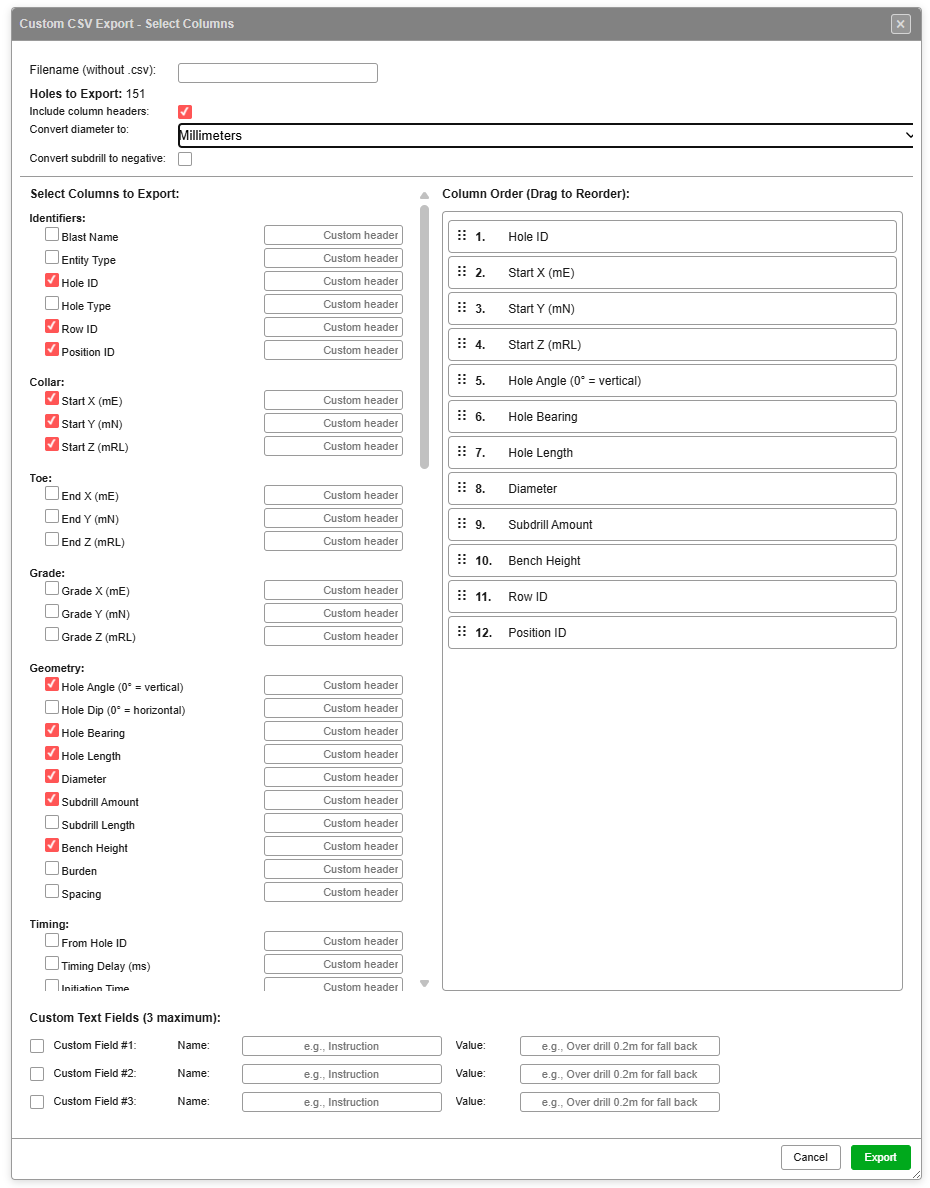 Left: field picker grouped by category. Right: column order (drag to reorder). Bottom: custom text fields and Export button.
File header controls
| Control | Purpose |
|---|---|
| Filename (without .csv) | Output filename — .csv is appended automatically |
| Holes to Export | Live count of visible holes that will be written (e.g. 151) |
| Include column headers | When ticked, the first row of the CSV is the column names |
| Convert diameter to | Unit conversion for the diameter column — dropdown with three options: Millimeters, Meters, Inches. mm → in divides by 25.4; mm → m divides by 1000 |
| Convert subdrill to negative | When ticked, subdrill values are written as negatives (some downstream systems expect this) |
Select Columns to Export
Fields are grouped by category. Tick each column you want to include. Each row has a Custom header input — type a name to override the default column header in the output CSV.
The Custom CSV dialog scrolls — the full field list spans four screen-heights. The screenshots below show each section.
Page 1 — Identifiers / Collar / Toe / Grade / Geometry / start of Timing
(See the main dialog screenshot above.)
| Group | Fields |
|---|---|
| Identifiers | Blast Name, Entity Type, Hole ID, Hole Type, Row ID, Position ID |
| Collar | Start X (mE), Start Y (mN), Start Z (mRL) |
| Toe | End X (mE), End Y (mN), End Z (mRL) |
| Grade | Grade X (mE), Grade Y (mN), Grade Z (mRL) |
| Geometry | Hole Angle (0° = vertical), Hole Dip (0° = horizontal), Hole Bearing, Hole Length, Diameter, Subdrill Amount, Subdrill Length, Bench Height, Burden, Spacing |
Page 2 — Timing / Measured / Charging Summary
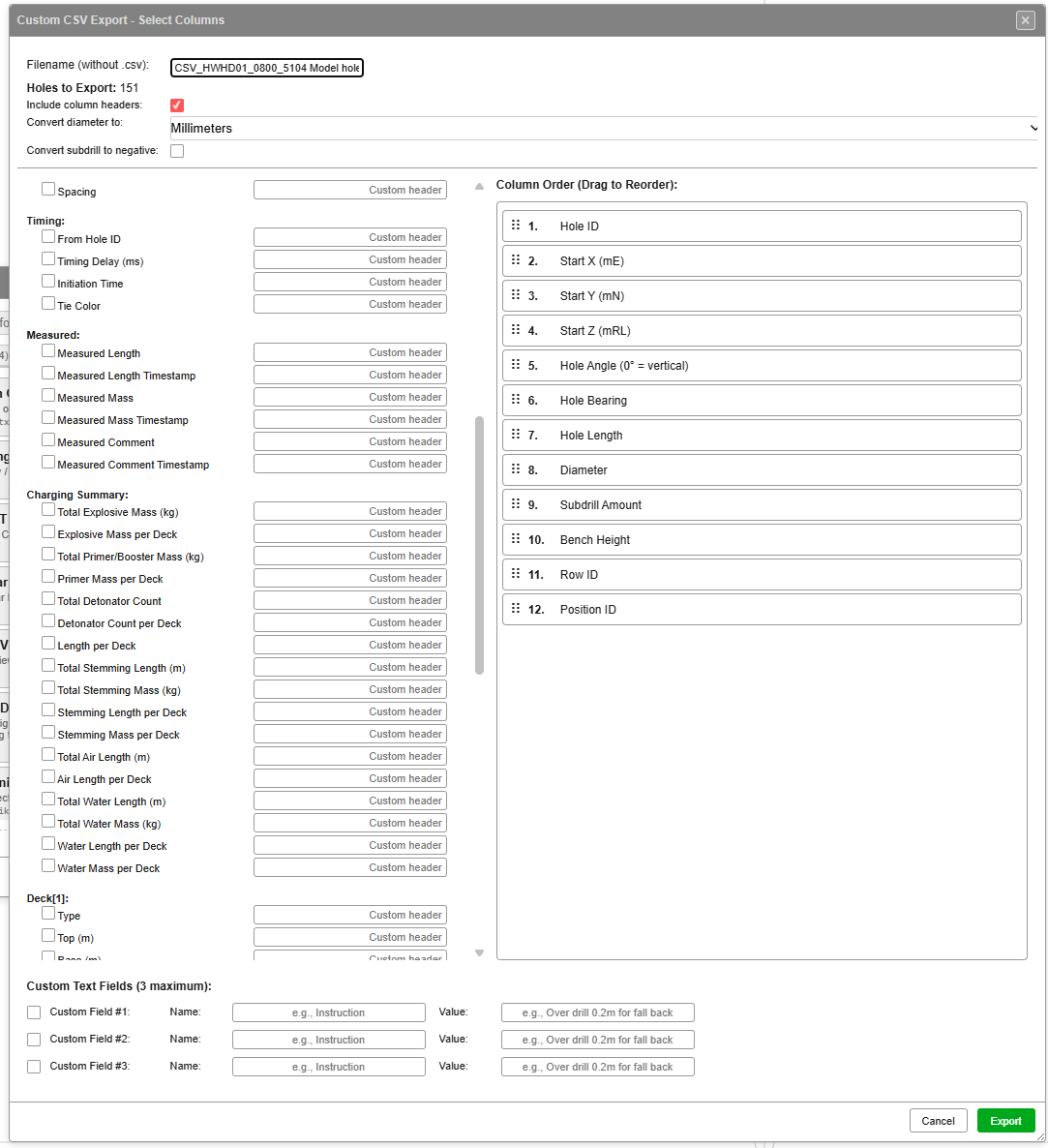
| Group | Fields |
|---|---|
| Timing | From Hole ID, Timing Delay (ms), Initiation Time, Tie Color |
| Measured | Measured Length, Measured Length Timestamp, Measured Mass, Measured Mass Timestamp, Measured Comment, Measured Comment Timestamp |
| Charging Summary | Total Explosive Mass (kg), Explosive Mass per Deck, Total Primer/Booster Mass (kg), Primer Mass per Deck, Total Detonator Count, Detonator Count per Deck, Length per Deck, Total Stemming Length (m), Total Stemming Mass (kg), Stemming Length per Deck, Stemming Mass per Deck, Total Air Length (m), Air Length per Deck, Total Water Length (m), Total Water Mass (kg), Water Length per Deck, Water Mass per Deck |
Charging Summary is write-only. The brace-packed
*per Deckcolumns (e.g.EXP{[1]0.000|[2]52.350}) are Excel-friendly but not parsed back on import. For round-trippable charging, use the Deck[N] and Primer[N] groups below.
Page 3 — Deck[N] groups
![Custom CSV Export — page 3 (Deck[1] / Deck[2])](/kirra-docs/screenshots/CustomCSVExport-3.png)
A Deck[N] group appears for each deck index from 1 up to the maximum deck count across the visible holes (capped at 20). Every group exposes the same 12 attributes:
| Group | Fields |
|---|---|
| Deck[N] | Type, Top (m), Base (m), Length (m), Product, Density (g/cc), Mass (kg), Scaling Mode, Top Formula, Base Formula, Length Formula, Mass Formula |
Round-trippable — *Formula columns carry the verbatim fx: string so formulas survive a re-import.
Page 4 — Primer[N] groups
![Custom CSV Export — page 4 (Primer[1])](/kirra-docs/screenshots/CustomCSVExport-4.png)
A Primer[N] group appears for each primer index across the visible holes:
| Group | Fields |
|---|---|
| Primer[N] | Deck Index, Depth (m), Depth Formula, Detonator, Detonator Type, Detonator Delay (ms), Detonator VoD (m/s), Detonator Qty, Booster, Booster Mass (g), Booster Qty, Total Downhole Delay (ms) |
Hole Angle vs Hole Dip. Both are exposed — pick the convention your downstream system uses:
- Hole Angle —
0°= vertical (Kirra’s native convention)- Hole Dip —
0°= horizontal (converted on export as90 − holeAngle)
Subdrill Amount vs Subdrill Length. Two fields, two conventions:
- Subdrill Amount — vertical Δz (m)
- Subdrill Length — along-hole subdrill (m)
Column Order (Drag to Reorder)
The right-hand panel lists every selected column with its position number (1, 2, 3, …). Drag rows to reorder — the output CSV writes columns in this order.
Custom Text Fields (3 maximum)
Three Name / Value pairs at the bottom let you append arbitrary text columns to every row. Useful for tagging exports with an instruction, a designer, a project code, or any fixed value the downstream system expects.
| Field | Example |
|---|---|
| Name | Instruction |
| Value | Over drill 0.2m for fall back |
The Name becomes the column header; the Value is written into every data row.
Charging round-trip (v1.0.270+)
The Charging Summary, Deck[N], and Primer[N] groups on pages 2-4 only appear when at least one visible hole has charging applied. The exporter scans the visible holes, finds the maximum deck and primer count, and emits exactly that many groups (capped at 20 each for dialog scannability).
When a CSV with deck*[N] or primer*[N] headers is re-imported through Custom CSV, the parser auto-detects the charging columns (no manual mapping needed) and reconstructs each hole’s charging — decks, primers, and verbatim fx: formula strings.
Charging columns are written as deck…[N] and primer…[N] headers (for example deckType[1], primerDepth[2]). See CSV Import → Custom CSV for the import side.
Round-trip limit: Formula strings ride along as text but only re-evaluate when a charge rule is next applied to the holes. The imported numeric values are the source of truth until then.
Footer
| Button | Action |
|---|---|
| Cancel | Close without exporting |
| Export (green) | Write the CSV file using the selected columns, order, custom fields, and any charging columns |
Charging CSV
On the Blasts tab the Export dialog has a single Charging CSV entry with a 4-option dropdown — picking the dropdown value selects the writer key.
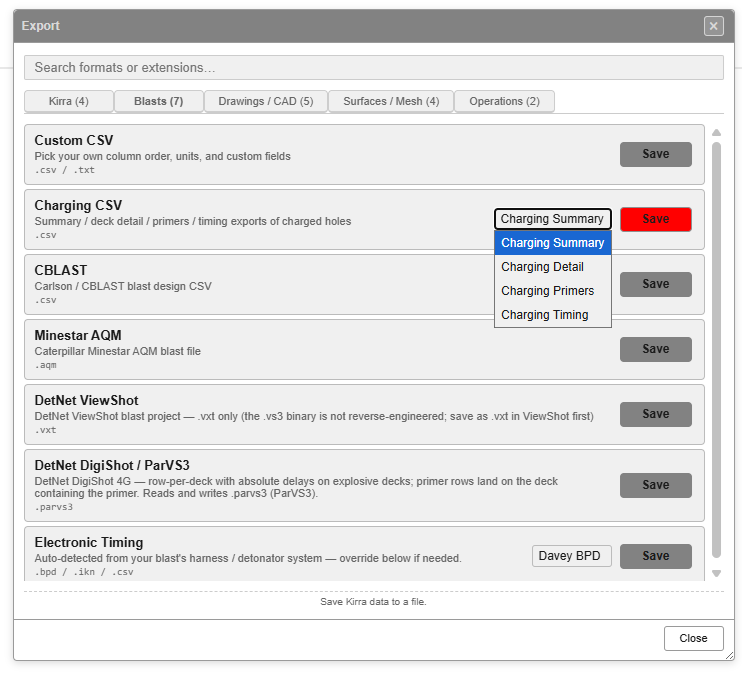 Blasts tab — Charging CSV row with dropdown showing the four sub-formats.
| Dropdown option | Writer key | What it writes |
|---|---|---|
| Charging Summary | charging-summary |
Per-hole charge totals (one row per hole) |
| Charging Detail | charging-detail |
Per-deck breakdown (one row per deck) |
| Charging Primers | charging-primers |
Primer placements |
| Charging Timing | charging-timing |
Computed deck fire times |
The row description reads “Summary / deck detail / primers / timing exports of charged holes”.
Only charged holes are written. Holes with no charging assignment are excluded. Assign charging in the Deck Builder first.
See Charging Overview for what each charging field carries.
Other entries on the Blasts tab
The Blasts tab in the Export dialog also includes:
| Format | Extensions | Notes |
|---|---|---|
| Custom CSV | .csv / .txt |
The flexible exporter documented above |
| CBLAST | .csv |
Carlson / CBLAST blast design CSV |
| Minestar AQM | .aqm |
Caterpillar MineStar AQM blast file |
| DetNet ViewShot | .vxt |
.vxt only (the .vs3 binary is not reverse-engineered) |
| DetNet DigiShot / ParVS3 | .parvs3 |
Row-per-deck with absolute delays on explosive decks; primer rows land on the deck containing the primer |
| Electronic Timing | .bpd / .ikn / .csv |
Auto-detected from your blast’s harness / detonator system — override the target vendor format in the dropdown (default detected from system; e.g. Davey BPD) |
Tips
- Coordinate units — Easting (X), Northing (Y), Elevation (Z) in metres
- Diameter — millimetres by default; Custom CSV lets you convert to inches or metres
- Delays — milliseconds, relative to
fromHoleID. Usena,n/a,null, ornanto write a null connector (the harness-wire convention) - File encoding — UTF-8 (no BOM)
- Decimal separator — period (
.); 4 decimal places by default - Empty fields — preset writers fill
NaNwith0.0000to stay parseable in non-tolerant readers; Custom CSV writes empty cells
Round-trip fidelity
| Round-trip | Preserves | Loses |
|---|---|---|
| 14 → import → 14 | name, ID, collar/toe, diameter, type, tying, delay, colour | grade, subdrill, measured, row/pos |
| 35 → import → 35 | everything the parser knows about | nothing |
| 35 → import → 14 → 35 | re-derives grade from subdrill (small drift) | rowID, posID, burden, spacing, connectorCurve |
| Custom CSV (geometry) → re-import | the geometry fields you ticked | anything you didn’t tick |
| Custom CSV with Deck[N] / Primer[N] → re-import | full charging state — decks, primers, verbatim formula strings | live formula re-evaluation until next Apply Charge Rule |
For the most faithful Kirra-to-Kirra round-trip, prefer KAP — it carries every project state (charging, timing constructs, drawings, surfaces, layers) instead of just the holes.
Related topics
- CSV Import — preset variants and Custom CSV import side
- DXF Export
- Other Formats (IREDES, AQM, KML)
- Charging Overview
- Hole Properties Reference