kirra-docs
DXF Export
Kirra exports blast designs and drawings to AutoCAD DXF format for use in CAD packages, mine planning software, and survey systems.
How to Export
- Click the Import Export Print button (file icon) in the menu bar and choose Export — or open the left sidenav (☰) and click Export under File Management
- In the Export dialog, open the Drawings / CAD tab and click Save on the DXF row
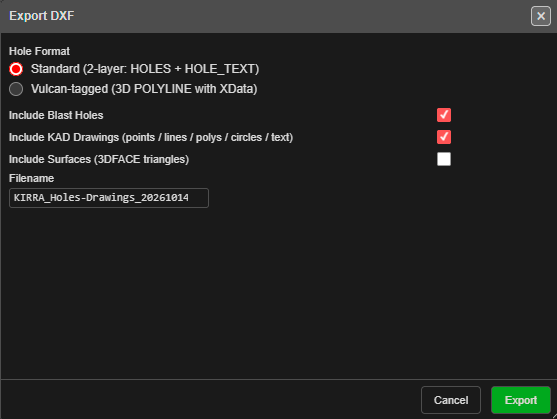
- In the Export DXF dialog, choose what to include and the hole format (see below)
- Check the Filename and click Export
Only visible holes, drawings and surfaces are exported. The dialog remembers your last choices.
Export DXF Options
One DXF file can carry any mix of holes, drawings and surfaces.
| Option | Default | Description |
|---|---|---|
| Hole Format | Standard | Standard (2-layer: HOLES + HOLE_TEXT) or Vulcan-tagged (3D POLYLINE with XData) |
| Include Blast Holes | On | Export the visible blast holes |
| Include KAD Drawings (points / lines / polys / circles / text) | On | Export the visible KAD drawings |
| Include Surfaces (3DFACE triangles) | Off | Export visible surface triangles as 3DFACE entities, one layer per surface |
| Filename | KIRRA_<content>_<date>_<time>.dxf |
Updated automatically as you change the options |
To export each visible surface to its own DXF file, use the DXF Surface (3DFACE) row on the Surfaces / Mesh tab of the Export dialog instead.
Standard Hole Layers
| Layer | Content |
|---|---|
HOLES |
A circle at the collar (sized to the hole diameter), a line from collar to toe, and small circles at the grade and toe |
HOLE_TEXT |
The hole ID as text at the collar |
Vulcan-tagged Holes
Each hole is written as a 3D POLYLINE through collar, grade and toe, with Vulcan XData tags (including the hole name). Holes are placed on a layer named after their blast.
KAD Drawing Layers
Each drawing keeps the layer it was imported on. Otherwise it goes on its Kirra drawing layer, or DXF layer 0 if it is on the default layer. Points become POINT, lines and polygons become polylines, circles become CIRCLE and text becomes TEXT. Kirra colours are converted to DXF colours.
Coordinate System
Exported coordinates use the project coordinate system with no transformation applied. Ensure your receiving software uses the same datum and projection.