kirra-docs
GLTF / GLB Export
Kirra exports surfaces and analysis results to GLB (binary GLTF) format for use in 3D viewers, Blender, and other mesh tools.
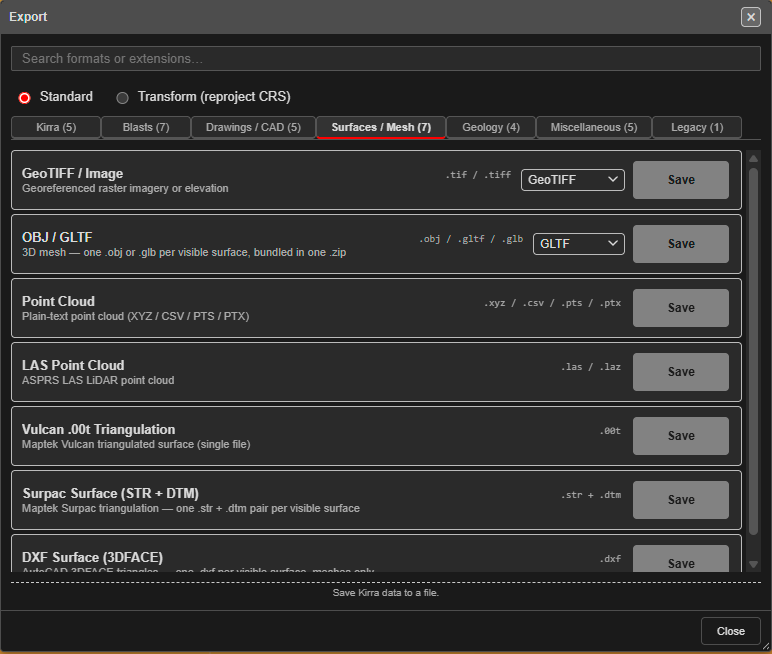
How to Export
- Make sure only the surfaces you want are visible — every visible surface is exported
- Click the Import Export Print button (file icon) in the menu bar and choose Export — or open the left sidenav (☰) and click Export under File Management
- In the Export dialog, open the Surfaces / Mesh tab. On the OBJ / GLTF row, choose a format from the dropdown and click Save:
- GLTF — one
.glbper visible surface, with elevation-based vertex colours - Baked GLB / Baked OBJ — opens the Export Baked Mesh dialog, which keeps textures and materials (use this for analysis surfaces). Its Format is GLB (recommended) or OBJ + MTL + images (zip)
- OBJ — one
.objper visible surface (geometry only)
- GLTF — one
- Several surfaces are bundled into one
.zip(for GLTF,exportedGLBs.zip) behind a single save
PLY appears in the dropdown but is import-only; choosing it shows a warning.
What Gets Exported
| Surface Type | Export Content |
|---|---|
| Analysis surfaces | Mesh geometry with baked shader texture and UV coordinates |
| Regular surfaces | Mesh geometry with elevation-based vertex colours |
Analysis Surface Persistence
The GLB format is used internally by Kirra to persist blast analysis results (particularly from the Blair Heavy CPU model) to IndexedDB. This prevents browser crashes on page reload for heavy computation results – the mesh is saved as a GLB blob and restored directly without re-running the analysis.
Compatibility
GLB files exported from Kirra can be opened in:
- Blender
- Windows 3D Viewer
- Three.js-based applications
- Any software supporting the Khronos GLTF 2.0 standard