kirra-docs
Blast Design Formats
The Blasts tab of the Import dialog reads blast designs from other blasting software: holes, and where the format carries them, ties, timing and charging.
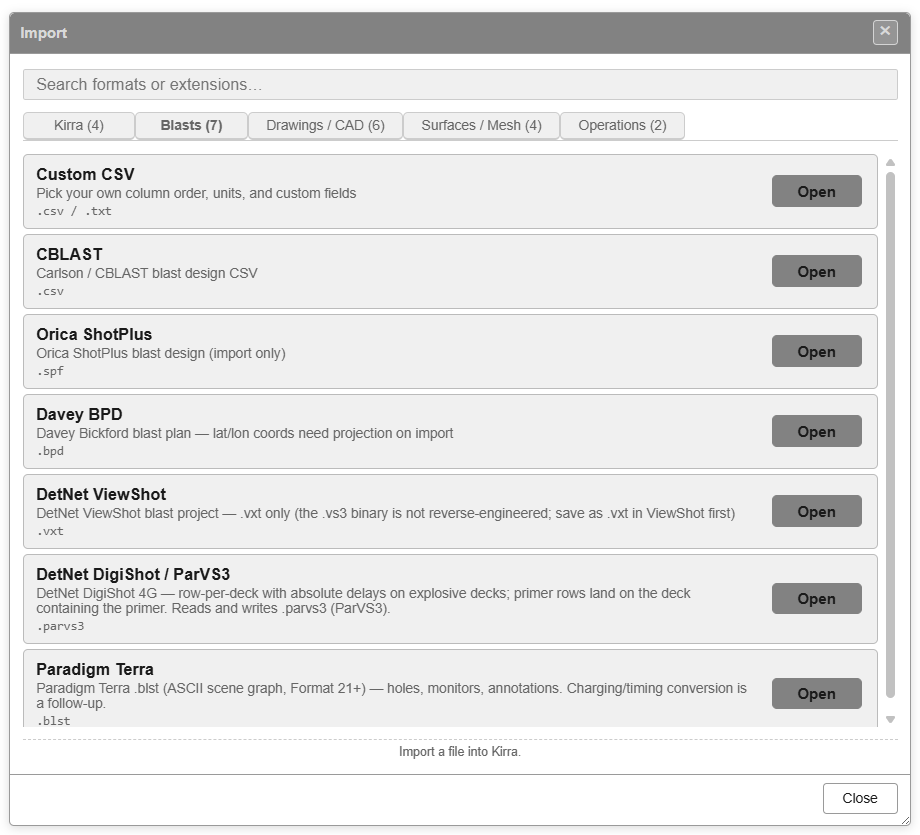
| Row | Extensions | Brings in |
|---|---|---|
| Custom CSV | .csv |
Holes from any column layout — see CSV Import |
| CBLAST | .csv |
Holes, delays and charging |
| Orica ShotPlus | .spf |
Holes, ties, products and charging |
| Davey BPD | .bpd |
Hole positions and timing |
| DetNet ViewShot | .vxt |
Holes, charging, harness wire and drawings |
| DetNet DigiShot / ParVS3 | .parvs3 |
Holes, decks and delays |
| Paradigm Terra | .blst |
Holes, charging, timing, monitors and annotations |
Each blast is named after the file unless the format carries its own blast name. Depending on the format, Kirra checks for data in another coordinate system, for a blast that has already been imported, and for holes landing on top of existing ones before the holes are added — see Checks on import.
ShotPlus, Davey BPD, ViewShot, DigiShot and Terra files can also be dropped onto the canvas.
A dropped .csv asks what it holds — Holes opens the Custom CSV import, so use the
Open button for CBLAST files.
CBLAST
Reads a CBLAST blast design CSV. Each hole is a group of records — hole, product, detonator and strata — and Kirra builds the hole, its delay and its decks from them.
- Diameter is read in metres and converted to millimetres.
- Angle is from vertical, as in Kirra. Holes come in with no subdrill — the grade is at the toe.
- A hole with no explosive product is typed No Charge; the rest are Production.
- The delay comes from the hole’s first detonator record.
- Decks are built from the product lengths. Product densities are not in the file, so set them in the Product Manager.
Orica ShotPlus
Reads a ShotPlus .spf design.
- Hole positions come from the design coordinates, or the actual coordinates where there is no design.
- Ties come across with their delays and colours.
- Burden and spacing are kept where the file has them.
- Products and charging are built, with the tie types linked to their products.
After the import, Review Imported Products lists the products Kirra created and how it classified each one. Set all Initiators to: changes every initiator at once; click Apply, or Keep Classifier to accept Kirra’s choices. A product check then runs, and only speaks up if something needs attention.
Products Kirra could not classify come in as bulk explosive with default values — check them in the Product Manager.
Davey BPD
Reads a Davey Bickford blast plan (.bpd). These files hold positions in latitude and
longitude, so Kirra asks where to project them:
- Pick the file.
- BPD Import — Coordinate System asks you to Select current projection — already set to WGS84, the system BPD files use — and Select destination projection, your project’s system. Choose an EPSG code, a CRS Library entry, or paste a Proj4 / WKT definition.
- Click Project & Import.
A blast plan carries positions and timing, not hole geometry. Holes come in vertical, with placeholder diameter, grade, angle, bearing and subdrill, and a default charge. Kirra says so when the import finishes — set these from your design afterwards.
DetNet ViewShot
Reads a ViewShot project saved as ViewShot Text (.vxt). The binary .vs3 format is
not supported: open the file in ViewShot and use File → Save As → ViewShot Text
(.vxt) first. Kirra tells you this if you pick a .vs3.
- Holes come in as Production, with burden and spacing worked out from the layout.
- Products, decks, primers and harness wire are built; boosters are chosen to suit the hole diameter.
- A file holding several patterns gives one blast per pattern.
- Chevrons, outlines and text in the project come in as drawings, in a layer named after the file.
ViewShot VXT Import Complete summarises the charging, products and harness wire, then the product review and check run as for ShotPlus.
DetNet DigiShot / ParVS3
Reads a DigiShot 4G .parvs3 file — one row per deck, with absolute delays on the
explosive decks. The file needs Hole ID, Collar X and Deck Number columns.
- Holes come in as Production.
- Diameters of 5 or less are taken as metres; a missing diameter defaults to 115 mm.
- Hole angles are read between 0° and 90°, so up-holes are not supported.
Paradigm Terra
Reads a Paradigm Terra .blst scene (Format 21 or later).
- The blast is named after the most common group in the file.
- The active charge scenario becomes the holes’ charging.
- Timing scenarios are added to the Electronic Timing list.
- Monitors become drawing points and annotations become text, in a layer named after the file.
Geology and the vibration, flyrock and overpressure settings in the file are not imported. Where the file names a generic electronic detonator or harness wire, Kirra uses a generic product in its place and says so.