kirra-docs
Assign Surface and Assign Grade
Set the collar, grade or toe of selected holes from a surface — or from a typed elevation when no surface is showing.
Subdrill is the vertical drop from grade to toe (grade Z − toe Z). The along-hole distance from grade to toe is the subdrill length, which is longer on an angled hole.
Prerequisites
- Select the holes first. With none selected, Kirra says “Select the holes to adjust, then choose Assign Surface again.”
- A visible surface, or an elevation to type.
Assign Surface (collar)
- Select the holes.
- Click Assign Surface on the Modify toolbar.
- What happens next depends on the surfaces showing:
| Visible surfaces | Kirra |
|---|---|
| One | Uses it straight away |
| Several | Asks Select Surface for Collar — choose one under Surface: and click Use |
| None | Asks Assign Collar Elevation — type it in Set collar elevation to: and click Apply |
Each collar moves along its own hole to the surface. The toe stays where it is, and the angle and bearing are kept — so on an angled hole the collar’s X and Y move too. Hole length and bench height are recalculated. Kirra reports “Successfully adjusted … holes to … collar elevation.”
Assign Grade
- Select the holes.
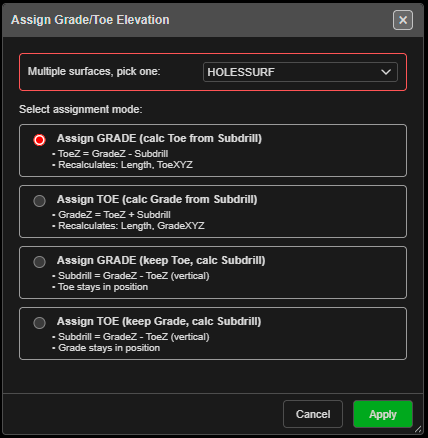
- Click Assign Grade on the Modify toolbar. Assign Grade/Toe Elevation opens.
- Pick the surface (or type an elevation if none is showing) and a mode, then click Apply.
| Mode | You set | Kept | Recalculated |
|---|---|---|---|
| Assign GRADE (calc Toe from Subdrill) (default) | Grade | Collar, subdrill | Toe, length, bench height |
| Assign TOE (calc Grade from Subdrill) | Toe | Collar, subdrill | Grade, length, bench height |
| Assign GRADE (keep Toe, calc Subdrill) | Grade | Collar, toe | Subdrill = grade Z − toe Z, bench height |
| Assign TOE (keep Grade, calc Subdrill) | Toe | Collar, grade | Subdrill = grade Z − toe Z, length |
The surface height is read at each hole’s collar position. Every mode keeps the angle and bearing, and the subdrill length is updated to match.
Design Plane holes
Holes set out on a Design Plane (see Section Plane) are moved along their own line to meet the surface. Kirra reports any that do not meet it. A typed elevation does not apply to them, and they are skipped.
Undo
The whole assignment is one Ctrl+Z step. It restores the holes and their charging.
Troubleshooting
Nothing happened. No holes were selected. Select them, then run the tool again.
The collar moved sideways. On an angled hole the collar slides along the hole to reach the surface — that is expected.
A hole was skipped. Holes lying almost flat cannot reach a different height along their own line.