kirra-docs
KAD Boolean
Combines closed polygons — union, intersect, difference or XOR — into new polygons. The originals are kept.
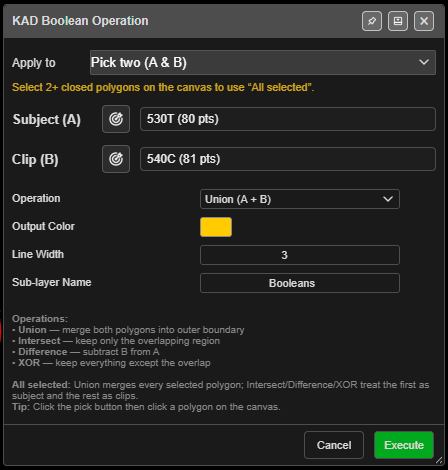
Combine polygons
- Click KAD Boolean on the Modify toolbar. KAD Boolean Operation opens.
- Choose what to combine under Apply to:
- All selected polygons — every selected closed polygon (select them with Shift on the canvas; the count updates while the dialog is open), or
- Pick two (A & B) — choose Subject (A) and Clip (B) from the lists, or with the target buttons on the canvas.
- Choose the Operation and click Execute.
You need at least 2 closed polygons: “Need at least 2 closed KAD polygons. Create polygons first, then use this tool.”
The fields
| Field | Default | What it does |
|---|---|---|
| Apply to | All selected when 2 or more are selected, otherwise Pick two (A & B) | Which polygons |
| Operation | Union (A + B) | Union (A + B), Intersect (A ∩ B), Difference (A - B), XOR (A △ B) |
| Output Color | Yellow #FFCC00 |
|
| Line Width | 3 | 1 – 10 |
| Sub-layer Name | Booleans | “Sub-layer under Analysis that the results are filed in” |
From the dialog: “All selected: Union merges every selected polygon; Intersect/Difference/XOR treat the first as subject and the rest as clips.”
What you get
New closed polygons named after the first input and the operation, for example
Pit_Union_ab12, on Analysis / Booleans — or your active layer. Their height is the average
of all the input points. The whole operation is one undo step.
Troubleshooting
“Boolean operation produced no results. The polygons may not overlap.” Intersect needs the polygons to overlap.
“Subject and Clip must be different polygons.” Pick two different polygons for A and B.