kirra-docs
Clip-KAD
Cuts selected drawings with a closed polygon — keep what is inside, keep what is outside, or split them and keep both.
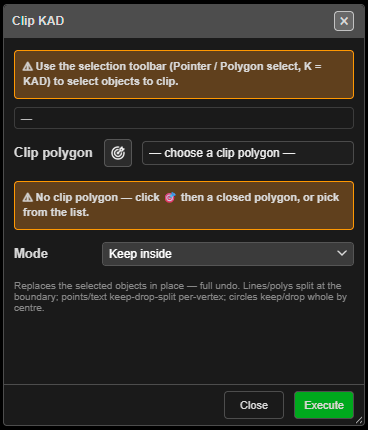
Clip drawings
- Click Clip-KAD on the Modify toolbar. The Clip KAD dialog opens and stays open.
- Select the drawings to clip with the Select toolbar (Pointer or Polygon select, K). The dialog counts them — “✔ 4 objects selected to clip”.
- Choose the Clip polygon:
- pick it from the list (it starts at — choose a clip polygon —), or
- click the target button, then click a closed polygon on the canvas.
- Choose the Mode and click Execute. The dialog stays open for the next clip.
- Close when done.
Modes
| Mode | Result |
|---|---|
| Keep inside (default) | Only the parts inside the polygon remain |
| Keep outside | Only the parts outside remain |
| Dissect (split, keep both) | Both parts remain, as separate drawings |
- Lines and polygons are cut at the boundary. The pieces are open lines.
- Points and text are kept, dropped or split by where each point lies.
- Circles are kept or dropped whole, by their centre.
What you get
The originals are replaced in place. Pieces are named after the original — Name_clip0,
Name_clip1… (_in / _out for points and text) — and stay on the original’s layer. Kirra
reports “Clip KAD (…): … replaced, … created.” The whole clip is one undo step.
Other ways to use it
| Method | Result |
|---|---|
| Change the selection while the dialog is open | The target count updates live |
| Target button | Freezes the current targets while you pick the clip polygon; click it again to cancel the pick |
| Switch to another tool | The dialog stays open, so you can use the Select toolbar |