kirra-docs
Grade Line
Sets a constant slope along part of a line — for haul roads, drains and ramps. Only the heights change; the line stays where it is in plan.
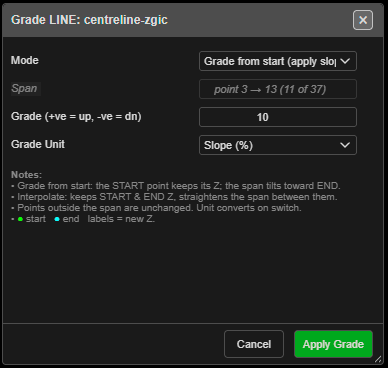
Grade a span
- Click Grade Line (set constant slope) on the Modify toolbar. The status line reads “Grade Line: click the START point on a line (right-click to exit)”.
- Click the start point on a line.
- Click the end point on the same line. It can come before or after the start.
- Grade LINE: … opens, and a preview labels each new height.
- Set the grade and click Apply Grade. The tool stays on for another span.
Polygons cannot be graded — “click the START point on a LINE (closed polygons not supported).”
The fields
| Field | Default | What it does |
|---|---|---|
| Mode | Grade from start (apply slope) | The start keeps its height and the span slopes towards the end. Interpolate start → end keeps both ends and straightens the span between them |
| Span | — | Read only, for example point 3 → 13 (11 of 37) |
| Grade (+ve = up, -ve = dn) | 10 | The slope. Greyed out in Interpolate, where it shows the slope worked out |
| Grade Unit | Slope (%) | Degrees (°), Slope (%) or Ratio (1:N). Changing it converts the value |
The slope is measured along the horizontal distance from the start. Points outside the span are not changed. The dialog remembers its settings for the session.
Other ways to use it
| Method | Result |
|---|---|
| Right-click with nothing picked | Ends the tool |
| Right-click after the start point | Steps back to picking the start |
| Cancel or Escape in the dialog | Drops the pick; the tool stays on |
| Works in 3D | A dashed cyan line previews the new slope |
Undo
Each Apply Grade is one Ctrl+Z step.