kirra-docs
Surface Intersection
Draws the line where two surfaces cross — a design against topography, a pit shell against the current pickup, a bench floor against a wall. The result is a set of KAD lines or polygons you can offset, export or use as a clip boundary.
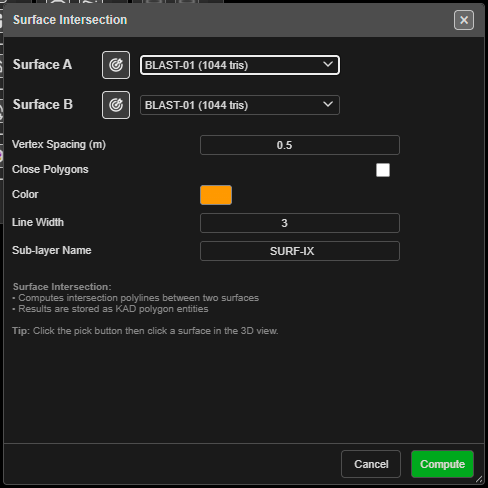
Intersect two surfaces
- Click Surface Intersection on the Surface toolbar. The Surface Intersection dialog opens.
- Choose Surface A and Surface B from the lists, or click the target button beside each and click the surface in the 3D view. The picked surface flashes green.
- Set the fields (below).
- Click Compute. A progress window reports each step and closes itself when done.
You need at least two loaded surfaces. With fewer, Kirra says “At least 2 loaded surfaces are required for intersection.” The lists include hidden surfaces; the pick button only finds visible ones.
The fields
| Field | Default | What it does |
|---|---|---|
| Vertex Spacing (m) | 1.0 | Simplifies the result: vertices closer than this are dropped. 0 keeps every vertex |
| Close Polygons | On | Closes each result into a polygon. Off gives open lines |
| Color | Yellow | Colour of the result |
| Line Width | 3 | Line width of the result (1–10) |
| Sub-layer Name | Intersections | The sub-layer the result is filed in |
The dialog remembers your last surfaces and settings in this browser.
What you get
One KAD entity per intersection line, named after both surfaces — for example
Topo_PitDesign_Intersect_a1b2. They are filed in the Analysis layer, under the
Sub-layer Name — or in your active layer, if you have chosen one. The whole set is one undo
step.
Troubleshooting
| Symptom | Cause | Fix |
|---|---|---|
| “Surface A and Surface B must be different.” | The same surface is in both lists | Choose a second surface |
| “No intersections found between the selected surfaces.” | The surfaces do not touch | Check them together in 3D |
| “Intersections found but all polylines were too short after simplification.” | Vertex Spacing (m) is larger than the pieces | Lower it, or set it to 0 |
| A closed polygon cuts across where you expected an open line | Close Polygons is on | Turn it off for crest or toe lines that run off the edge |
Other ways to use it
| Method | Result |
|---|---|
| Target button, then click in 3D | Picks a surface without searching the list |
| Vertex Spacing (m) = 0 | Keeps every crossing point, for the most exact line |
| Close Polygons off | Open strings, for crest and toe lines |
Related
- Clip Surface — clip with the result
- Offset KAD
- Compare Surfaces — measure the gap instead of finding the crossing
- Surfaces Toolbar