kirra-docs

Surfaces Toolbar

The Surface toolbar groups the controls for building, modifying, and repairing triangulated surface meshes — triangulation, mesh intersection, boolean operations (two engines), extrude, contour, and mesh repair. It is one of the floating toolbars on the right side of the Kirra workspace.


Toolbar Overview

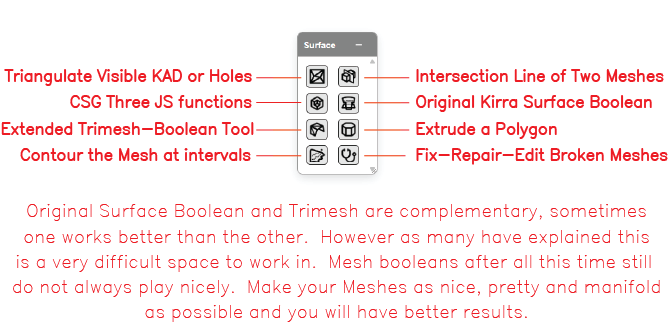
Labelled Surface toolbar The Surface toolbar with all controls labelled.

The Surface toolbar contains the following controls:

Control Type Purpose
Triangulate Visible KAD or Holes Dialog Build a triangulated surface from visible KAD entities or hole collars
Intersection Line of Two Meshes Tool Compute and draw the intersection polyline between two surface meshes
CSG Three JS functions Dialog Original Three.js CSG boolean operations (union / difference / intersect)
Original Kirra Surface Boolean Dialog Kirra’s first-generation surface boolean engine
Extended Trimesh-Boolean Tool Dialog Newer Trimesh-Boolean engine (v0.3.0) running in a Web Worker
Extrude a Polygon Dialog Sweep a closed polygon to a target elevation to build a 3D solid
Contour the Mesh at intervals Dialog Generate contour lines at regular elevation intervals
Fix-Repair-Edit Broken Meshes Dialog Clean Mesh / Mesh Edit dialog — repair holes, remove self-intersections, edit vertices and triangles

On open meshes, the Original Surface Boolean and Trimesh-Boolean engines are complementary — sometimes one engine succeeds where the other fails. Mesh booleans are difficult; make your meshes as clean and manifold as you can before running them.


Triangulate Visible KAD or Holes

Builds a triangulated surface from visible inputs — KAD polygons / lines / points, or blast hole collars.

Build Triangulations dialog

How to use

  1. Make the input entities visible in the Data Explorer (only visible entities are considered)
  2. Click the Triangulate Visible KAD or Holes button on the Surface toolbar
  3. Choose the input set: visible KAD entities or hole collars
  4. Configure triangulation options [VERIFY: full options list]
  5. Click Build to generate the surface

See Importing Surfaces for surface-loading workflows and Mesh Editing for cleanup after triangulation.


Intersection Line of Two Meshes

Computes the polyline where two surface meshes intersect and draws it as a KAD line entity. Useful for slope-vs-design intersections, pit-shell vs topography, and toe / crest line extraction.

How to use [VERIFY: dialog vs direct two-mesh pick]

  1. Click the Intersection Line of Two Meshes button on the Surface toolbar
  2. Pick Mesh A
  3. Pick Mesh B
  4. The intersection polyline is added as a KAD line entity

[SCREENSHOT NEEDED: Intersection Line dialog or workflow]


CSG Three JS functions

Original Three.js CSG boolean operations on closed solid meshes. Three operations:

Operation Result
Union A ∪ B — merged solid
Difference A − B — A with B subtracted
Intersect A ∩ B — only the overlap

How to use

  1. Click the CSG Three JS functions button on the Surface toolbar
  2. Pick Mesh A and Mesh B
  3. Choose the operation
  4. Click Apply

Note: The Three.js CSG engine works best on closed, manifold solids. For open surfaces, use the Original Kirra Surface Boolean or the Trimesh-Boolean Tool.

See Surface Boolean & CSG for the full reference.


Original Kirra Surface Boolean

Kirra’s first-generation surface boolean engine. Designed to work on open surface meshes (e.g. design surfaces with no roof), not just closed solids.

How to use

  1. Click the Original Kirra Surface Boolean button on the Surface toolbar
  2. Pick Mesh A and Mesh B
  3. Choose the operation (union, difference, intersect)
  4. Click Apply

Original Surface Boolean and Trimesh-Boolean are complementary, sometimes one works better than the other. Try the other engine if the first fails.

See Surface Boolean & CSG for the full reference.


Extended Trimesh-Boolean Tool

Kirra’s newer boolean engine (Trimesh-Boolean v0.3.0), running in a Web Worker so it does not block the UI on large meshes.

How to use

  1. Click the Extended Trimesh-Boolean Tool button on the Surface toolbar
  2. Pick Mesh A and Mesh B
  3. Choose the operation
  4. Click Apply — progress is reported as the worker runs

See Surface Boolean & CSG for the full reference.


Extrude a Polygon

Sweeps a closed KAD polygon up or down to a target elevation, producing a 3D solid mesh. Used for pit shells, bench solids, and design volumes.

Completed extruded solid

How to use

  1. Select a closed KAD polygon
  2. Click the Extrude a Polygon button on the Surface toolbar
  3. Set the target elevation (or extrude depth)
  4. Click Apply to produce the solid

See Extrude, Boolean, and Section Plane for the full reference.


Contour the Mesh at intervals

Generates contour lines (constant-elevation polylines) at regular intervals across a surface mesh.

How to use

  1. Click the Contour the Mesh at intervals button on the Surface toolbar
  2. Pick the surface mesh
  3. Set the interval in metres (e.g. 1.0 m)
  4. Set the base elevation (the reference Z from which intervals are stepped)
  5. Click Generate — contours are added as KAD line entities

See Surface Contours for the full reference.


Fix-Repair-Edit Broken Meshes

Opens the Clean Mesh / Mesh Edit dialog — repair self-intersections, fill holes, decimate, and interactively edit triangles and vertices.

Mesh repair dialog

Capabilities

How to use

  1. Click the Fix-Repair-Edit Broken Meshes button on the Surface toolbar
  2. Pick the mesh to repair
  3. Run automated cleanup (self-intersection removal, hole fill)
  4. Switch to interactive edit mode for hand-editing
  5. Save the cleaned mesh

See Mesh Editing for the full reference.


Why two boolean engines?

Original Surface Boolean and Trimesh-Boolean are complementary, sometimes one works better than the other. However as many have explained this is a very difficult space to work in. Mesh booleans after all this time still do not always play nicely. Make your meshes as nice, pretty and manifold as possible and you will have better results. — in-app note on the Surface toolbar

In practice:

Try one, and if it fails, try the other engine on the same input before reaching for the mesh repair tool.