kirra-docs
Bake Delay
Moves the surface timing onto the electronic detonators. Each hole’s firing time — from its ties, connector delays and travel times — is written into its electronic primers as an absolute programmed time. The toolbar button is Bake Delay (electronic + nonel→electronic conversion).
Before you start
- The holes need firing times — tie them to an initiation point.
- Bake works on electronic primers. Kirra offers to add or replace detonators first (below).
- Decide which holes to bake (the scope):
| Selection | Holes baked |
|---|---|
| Holes are selected | The selection, visible or not, across any number of blasts |
| Nothing selected, one blast visible | Every visible hole in that blast |
| Nothing selected, several blasts visible | Refused — “Select the holes to bake” |
| Nothing visible | Refused — “Nothing to bake” |
Bake
- Click Bake Delay on the Connect toolbar. It is a one-click action — the button does not stay pressed.
- If holes have no detonator, or carry primers that cannot hold a programmed time, Kirra asks first (see Adding or replacing detonators).
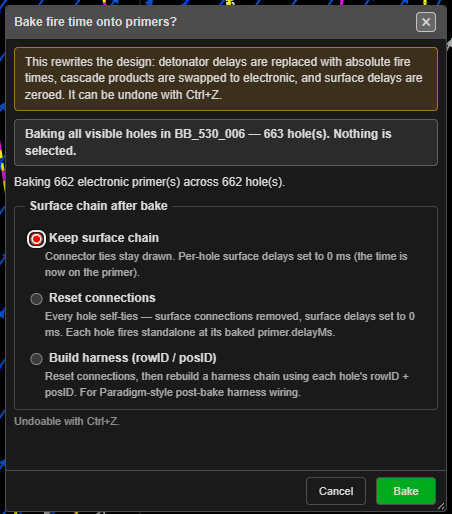
- The Bake fire time onto primers? dialog shows what is about to happen. Choose what happens to the surface ties under Surface chain after bake.
- Click Bake, or Cancel.
Bake can be undone with Ctrl+Z.
Surface chain after bake
| Option | Result |
|---|---|
| Keep surface chain | Ties stay drawn. Each hole’s surface delay becomes 0 ms — the time is now on the primer |
| Reset connections | Every hole is tied to itself, surface ties are removed and surface delays set to 0 ms. Each hole fires on its baked primer time alone |
| Build harness (rowID / posID) | Resets connections, then rebuilds a harness chain from each hole’s row and position |
Keep surface chain is selected the first time. After that the dialog remembers your last choice until Kirra is closed.
What the dialog tells you
The Bake fire time onto primers? dialog lists, before you click Bake:
- What it rewrites: “detonator delays are replaced with absolute fire times, cascade products are swapped to electronic, and surface delays are zeroed.”
- The scope — your selection, or all visible holes in one blast.
- How many electronic primers and holes are baked.
- Holes with no firing time (NA / null). These are never baked — writing 0 ms into a hole that is meant not to fire is a safety matter.
- Holes fed by a cord trunk (their times include the trunk’s inline connectors), and holes on a cord trunk the signal never reaches.
- Primers skipped because they are not electronic programmable detonators.
Adding or replacing detonators
Before the bake dialog, Kirra checks the holes:
| Found | Dialog | Button |
|---|---|---|
| Holes with no detonator | No detonators in hole | Add |
| Holes with a nonel, electric or cord primer | Replace in-hole primers? | Replace |
Each dialog has a Detonator and a Booster list. They show the products in your catalogue first, then Create G-EDET (generic electronic) and Create G-Booster (sized to the hole). A new primer goes in at 80% of the hole length from the collar — move it in charging if you want it elsewhere.
Replace is asked first when both apply. Both can be undone with Ctrl+Z. After either one, the bake dialog opens on the same holes.
Troubleshooting
| Symptom | Cause | Fix |
|---|---|---|
| “Select the holes to bake” | Several blasts are visible and nothing is selected | Select the holes, or hide the other blasts |
| “Nothing to bake” — holes have no fire time | No hole in scope has a time | Tie them to an initiation point, then bake again |
| “Nothing to bake — no surface chain on the visible holes or no electronic primers to write to.” | No timing, or no electronic primers | Tie the holes, or add detonators |
| Some holes were not baked | They have no firing time (NA / null) | Give them a time and a primer, then bake again |
| Primers skipped | They are not electronic | Replace them when Kirra asks, or in charging |
Other ways to use it
| Method | Result |
|---|---|
| Bake Delay in the Electronic Timing dialog footer | Bakes the active construct’s assigned holes, or every visible hole when none are assigned. The same scope rules apply |
| Bake Delay in the Time Window dialog | The same bake from the timing analysis |
| Ctrl+Z | Undoes the bake, and any detonators it added or replaced |