kirra-docs
Clean Mesh
Finds and repairs the faults that stop a surface working as a solid — open edges, crossing and overlapping triangles, unwelded points and mixed-up normals. Use it before a volume, a boolean, a clip or a slice, and whenever a surface imported from another package behaves oddly.
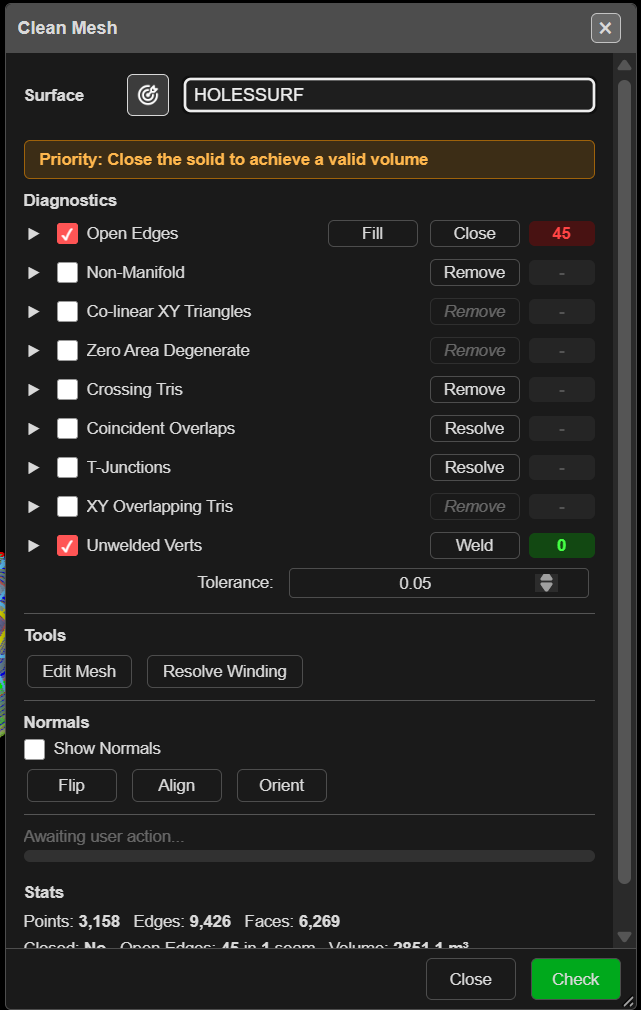
Check and repair a surface
- Click Clean Mesh on the Surface toolbar. The Clean Mesh dialog opens on the first visible surface, switches the view to 3D, and runs a check.
- Choose the surface from the list, or click the target button and click it in the 3D view.
- Tick the faults you want to look for under Diagnostics, then click Check. Each row shows a count, and the faults are highlighted in 3D.
- Click the button on a row to repair that fault. Kirra re-checks afterwards.
- Click Close when the counts are where you want them.
Repairs change the surface in place and are saved straight away. Each repair is one step you can undo with Ctrl+Z and redo with Ctrl+Y. On a surface of more than 500,000 triangles a repair cannot be undone — the status bar says so — so keep a copy or export it first.
Tip: When the surface is not closed, an orange banner reads “Priority: Close the solid to achieve a valid volume”. Deal with Open Edges first: several remove buttons stay disabled until it is fixed, with the tip “Fix open edges first. Removing triangles may break topology.”
Diagnostics
| Row | On by default | Repair | What it finds |
|---|---|---|---|
| Open Edges | Yes | Fill, Close | Edges used by only one triangle — gaps and holes |
| Non-Manifold | No | Remove | Edges shared by more than two triangles |
| Co-linear XY Triangles | No | Remove | Triangles with no area in plan (vertical slivers) |
| Zero Area Degenerate | No | Remove | Triangles with no area at all |
| Crossing Tris | No | Remove | Triangles that pass through each other |
| Coincident Overlaps | No | Resolve | Triangles lying on top of each other |
| T-Junctions | No | Resolve | A point sitting on another triangle’s edge without joining it |
| XY Overlapping Tris | No | Remove | Triangles overlapping in plan |
| Unwelded Verts | Yes | Weld | Points that should be one point |
Tolerance: sets the weld distance — default 0.0012 m. It is remembered in this browser and used only by Clean Mesh.
Open the arrow on a row to list each fault. Click an item to zoom to it; its own repair button fixes only that one, after showing a before-and-after with Apply or Cancel.
Fill or Close?
- Fill patches holes whose edges form a clean loop, and keeps the result only if the open edges went down. If it cannot, it suggests a Weld at about 0.001–0.002 m first.
- Close works harder: it welds, removes bad triangles, stitches nearby edges and caps what is left. Use it when Fill says “Fill couldn’t close these”.
Some repairs check first and warn when they would open the mesh or remove a lot — Continue or Cancel.
Tools and normals
| Control | What it does |
|---|---|
| Edit Mesh | Opens the Mesh Edit tool to fix triangles by hand |
| Resolve Winding | Re-cuts triangles that fold through each other |
| Show Normals | Draws the direction each triangle faces |
| In / Out | Points every normal into or out of a closed solid |
| Flip | Reverses every triangle of an open surface |
| Align | Makes the triangles of an open surface face the same way |
| Orient | Fixes winding across the whole mesh and reports the volume |
In and Out appear only for closed solids; Flip and Align only for open surfaces.
Stats at the foot of the dialog lists points, edges and faces, whether the surface is Closed, the open edges and the volume. A volume is only reliable when Closed reads Yes.
Troubleshooting
| Symptom | Cause | Fix |
|---|---|---|
| “No editable surfaces loaded.” | No surface, or only textured meshes | Clean Mesh does not edit textured OBJ meshes |
| Closed reads No | The surface has open edges, so its volume is unreliable | Clear Open Edges with Fill or Close |
| “Fill couldn’t close these — repair by hand” | The gap edges do not meet cleanly | Weld at 0.001–0.002 m, then Close, or fill in Edit Mesh |
| Lighting looks patchy | Triangles face different ways | Orient, or Align on an open surface |
| A boolean or slice fails on this surface | Open edges or crossing triangles | Clear every row, then try again |
Other ways to use it
| Method | Result |
|---|---|
| Right-click a surface → Clean in its properties | Opens Clean Mesh on that surface |
| The ⚠ volume badge on a solid in the tree → Clean | Opens Clean Mesh from the Unreliable Volume warning |
| One item’s own repair button | Fixes a single fault, with a before-and-after |
Related
- Mesh Editing — fix triangles by hand
- Clip Surface
- Solid Horizon Slice
- Trimesh Boolean
- Surfaces Toolbar