kirra-docs
Solid Horizon Slice
Cuts a closed solid into horizontal bands — one solid per bench or horizon — each capped and named by its RL range. Use it to split a design or a pit-shell volume into benches for scheduling, volumes and tonnes.
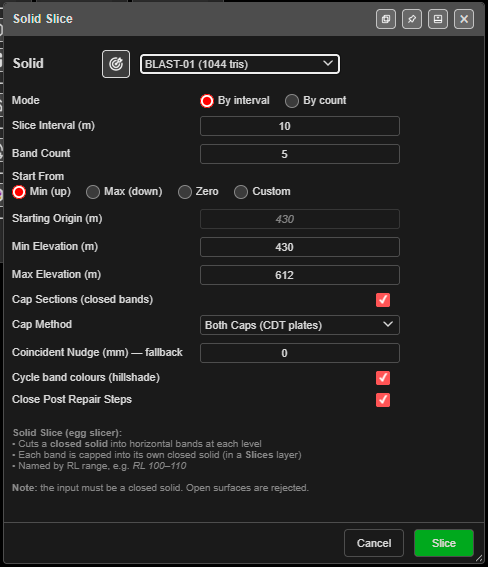
Slice a solid
- Click Solid Horizon Slice on the Surface toolbar. The Solid Slice dialog opens.
- Choose the Solid, or click the target button and click it in the 3D view.
- Choose the Mode:
- By interval — cut every Slice Interval (m).
- By count — cut into Band Count equal bands.
- Set where the levels start and the range (below).
- Click Slice. A progress window reports each band as it closes, then a summary.
The solid must be closed. An open surface stops with Not a Closed Solid — close it with Clean Mesh first.
The fields
| Field | Default | What it does |
|---|---|---|
| Mode | By interval | By interval or By count |
| Slice Interval (m) | 10 | Distance between cuts (By interval) |
| Band Count | 5 | Number of equal bands (By count) |
| Start From | Min (up) | Min (up), Max (down), Zero or Custom |
| Starting Origin (m) | The solid’s lowest point | The level cuts are counted from. Editable with Custom only |
| Min Elevation (m) / Max Elevation (m) | The solid’s bottom and top | Where the cuts may fall |
| Cap Sections (closed bands) | On | Caps each band into a closed solid |
| Cap Method | Nudge (section — default) | Or Both Caps (CDT plates), Top Cap only (CDT), Bottom Cap only (CDT) |
| Coincident Nudge (mm) — fallback | −0.1 | How far a cut moves when it lands exactly on a flat berm |
| Cycle band colours (hillshade) | On | A different colour per band. Off keeps the solid’s colour |
| Close Post Repair Steps | On | Tidies each band after the cut; a band is never made worse |
Min and Max only decide where the inner cuts fall — the top and bottom bands still run to the solid’s real top and bottom. The dialog remembers your settings in this browser.
Tip: For bench solids, choose Custom, enter one bench floor RL as the Starting Origin (m), and set Slice Interval (m) to the bench height.
What you get
New solids in the Slices layer, named by RL range — for example Pit RL 100–110. The
original solid is kept. A band that would not close is marked ` (open)`.
The summary says whether every band closed, how many cuts were made, and whether any cut landed on a bench or berm and was adjusted.
Troubleshooting
| Symptom | Cause | Fix |
|---|---|---|
| Not a Closed Solid | The surface has open edges | Close it in Clean Mesh |
| A Large Solid warning | The solid is over the 3D triangle limit | Raise the limit in Settings, or decimate the surface |
| “Too many bands (…)” | Over 2,000 bands | Raise the interval or lower the count |
| A band ends in ` (open)` | A gap in the solid at that level | Repair the solid and slice again |
Other ways to use it
| Method | Result |
|---|---|
| By count | Equal bands without working out an interval |
| Start From → Custom | Cuts on your bench RLs |
| Cycle band colours (hillshade) off | Bands keep the solid’s colour |
Related
- Extrude KAD to Solid — make a solid to slice
- Contour Surface — lines at the same levels
- Clean Mesh
- Surfaces Toolbar