kirra-docs
After Drilling and Charging
Record what was actually drilled and loaded against the design, find the holes that differ, re-fit their charging, and hand the as-built record back. Each step names the tool and links to its guide.
Before you start
- The designed blast in Kirra — see Plan a Shot, Start to Finish.
- The field figures: dipped lengths, loaded masses and comments, either on paper or in a file. A downhole survey file, if the holes were surveyed.
1. Record the measured values
| You have | Do this | Guide |
|---|---|---|
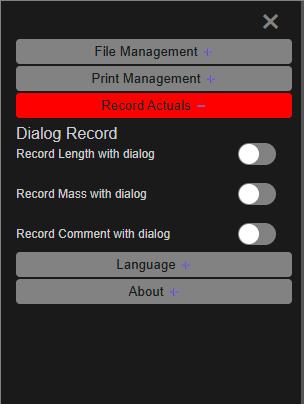
| Figures to type in, hole by hole | Switch on Record Length with dialog, Record Mass with dialog or Record Comment with dialog in the side panel (☰), then click each hole in the 2D view | Record Actuals |
| A file of measured values | Import → Kirra tab → Measured Data | Measured Data |
Each value is saved on the hole with the date and time. A Measured Data file matches rows to holes by blast name and hole ID, and skips rows with no matching hole.
2. Bring in the drilled hole paths (optional)
A downhole survey — depth, heading and inclination — shows where each hole actually went. Import → Miscellaneous tab → Borehole Telemetry turns it into one drawing line per hole — see Borehole Telemetry. Check the burden on the drilled hole in the Hole Section View.
3. See the measured values
- Show them as labels with the Measured Length, Measured Mass and Comment buttons on the display toolbar.
- Colour the blast by them: set the Voronoi to Measured Length or Measured Mass.
- Plot their spread in Blast Quality — choose Measured Length or Measured Mass under Chart. Holes with no measurement are left off.
4. Fix the holes that differ
Kirra charges each hole to its design length. Recording a measured length does not change the hole or its charging.
For a hole drilled short or long:
- Right-click it and open Edit Hole. Change its Subdrill (m) or Grade Z RL (m) so the length matches what was drilled, and click Apply — see Editing Holes.
- Select the changed holes and click Reapply Charging on the Holes toolbar. The decks are re-fitted to the new length, following each deck’s scaling setting.
To load some holes with a different rule, apply that rule instead — see Deck Builder.
5. Compare the loaded blast with the design
Set the Voronoi to PF - Measured (mass/volume) and then PF - Designed and compare — see Voronoi Cells. PF - Measured uses the measured mass; holes with none have no value. Then re-run the checks you need from Check a Blast Before Firing.
6. Hand back the as-built record
| To | Do this |
|---|---|
| Send the measured values to another system or project | Export → Kirra tab → Measured Data — see CSV Export |
| Keep the whole blast as built | Save a Kirra Application Project — see Save a project |
| Print the as-built plan | Turn on the measured labels, then print — see Print from Template (XLSX) |
7. After the dig (optional)
When the blast has been dug and surveyed, colour the new pickup by its distance from the design with Compare Surfaces on the Analyse toolbar — where the wall is fat, and where it is overdug.
Common problems
| Problem | Cause and fix |
|---|---|
| Clicking a hole does not record anything | Record Actuals works in the 2D view, and hidden holes are skipped |
| Measured Data rows were ignored | The blast name or hole ID in the file does not match the holes in Kirra. Check both, including case |
| The charging did not follow the measured length | Charging follows the design length. Change the hole, then run Reapply Charging |
| PF - Measured is blank | No measured mass recorded on those holes |
| Telemetry paths are missing for some holes | Their collars could not be found. The import report lists them |