kirra-docs
Plan a Shot, Start to Finish
The route from an empty workspace to a printed, charged and timed blast plan. Each step names the tool and links to its guide. For a click-by-click first run, follow Your First Blast instead.
Before you start
- A workspace for the job — see Workspaces. Kirra saves into it as you work.
- Your site’s products, charge rules and pattern templates. If someone has them as a Kirra App
Template (
.kat), import it first — see Back up and move your work. - The ground the blast sits on: a pickup surface, a design floor, or both. To get one ready, see Prepare a Surface for Design.
1. Set up a pattern template
A template holds the burden, spacing, diameter, angle, subdrill, colour, text and charge rule for one kind of hole, so every hole you lay out starts right.
- Open Pattern Templates on the Holes toolbar and add a template — see Pattern Templates.
- On its Charging tab, tick Charge Holes and pick the rule, so new holes are charged as they are made — see Charging Tab.
Warning: If the rule needs a product your Product Manager does not have, the holes are not charged at all. The line under Charge Config tells you before you start.
2. Lay out the holes
Pick the pattern tool that matches what you have — the Which pattern tool? table chooses for you:
| You have | Use |
|---|---|
| A blast boundary drawn as a polygon | Pattern in Polygon |
| A start point and a regular grid | Add Pattern |
| A single row (presplit, buffer, trim) | Holes Along Line |
| A crest, toe or design line to follow | Holes Along Polyline |
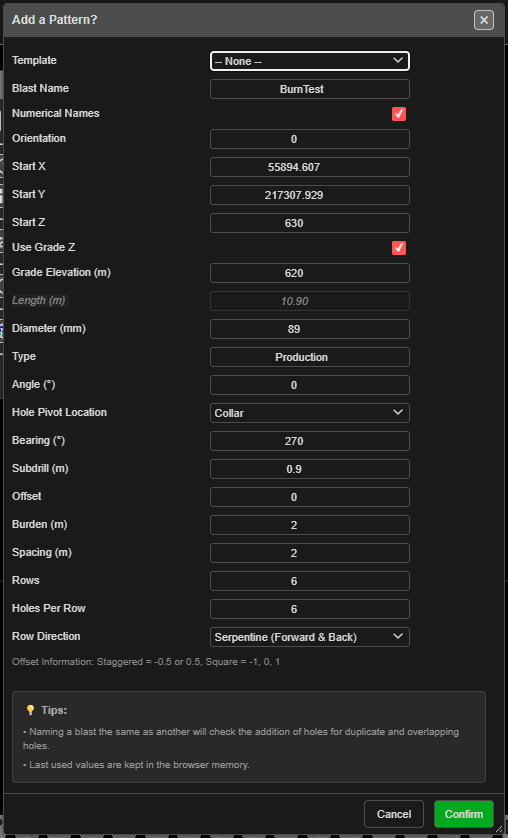
Pattern tools are click-first: you click on the canvas — the start point, or the polygon and the row line — and then the dialog opens. Choose your template at the top of that dialog.
3. Put the holes on the ground
- Select the holes.
- Assign Surface on the Modify toolbar moves each collar onto the pickup.
- Assign Grade sets the floor (or the toe) from a design surface or a typed elevation.
See Assign Surface and Assign Grade. Both keep each hole’s angle and bearing, and recalculate length and bench height.
4. Tidy the pattern
| Job | Tool |
|---|---|
| Change a hole, or many at once | Right-click → Edit Hole — see Editing Holes |
| Add a hole in a row | Insert Holes |
| Fix row and position numbers | Reorder Rows |
| Renumber a run of holes | Renumber Holes |
| Keep clear of the last shot’s holes or a no-drill zone | Coincident Holes Check |
5. Charge the holes
Skip this if the template charged them.
- Check the products are in the Product Manager.
- Select the holes, click Charge Rule Builder on the Holes toolbar, click Apply Rule…, choose the rule, then Apply to Selected — see Applying a Charge Design to Holes.
- Changed hole lengths afterwards? Select them and click Reapply Charging.
6. Tie and time the blast
- Set Delay Amount, colour and product on the Connect toolbar before you tie — see Connector Settings.
- Tie the holes with the tool that suits the layout — see Which tie tool?.
- Mark where the blast is lit from with Self Connect Add IP — see Initiation Points. A blast with no initiation point has no firing times.
- For electronic detonators, see Electronic Timing Constructs.
7. Check it
Turn on Hole Time and look for holes with no time — they are not tied back to an initiation point. Then run the checks in Check a Blast Before Firing: timing, powder factor, vibration and flyrock.
8. Print the plan
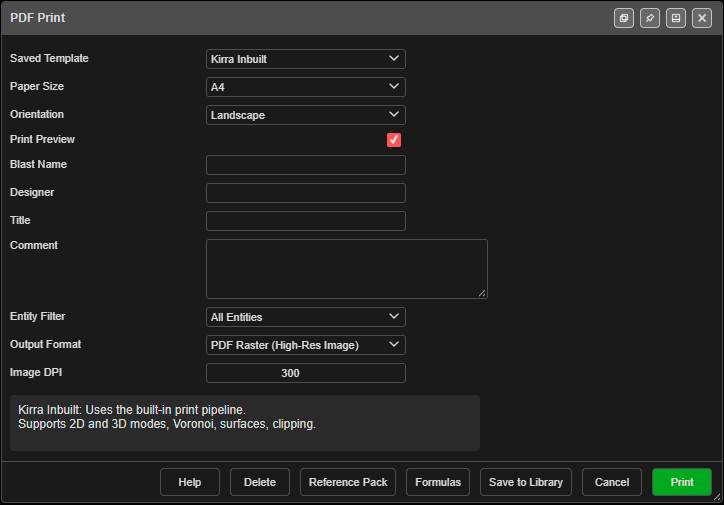
Open Import Export Print in the top bar and choose Print. The PDF Print dialog prints with Kirra Inbuilt or your own XLSX template — see Print from Template (XLSX).
9. Hand it over
| Who needs it | Export | Guide |
|---|---|---|
| The drill rig | Miscellaneous tab → Epiroc Surface Manager → IREDES Drill Plan, or Blasts tab → Minestar AQM | Other Formats |
| CAD or the mine planning package | DXF | DXF Export |
| A spreadsheet or another system | Holes CSV, Custom CSV, Charging CSV | CSV Export |
| You, later — or a colleague | Kirra Application Project (.kap) |
Save a project |
Tip: The drill-rig and DXF exports write visible holes only. Hide the blasts you do not want in the file first.
Common problems
| Problem | Cause and fix |
|---|---|
| New holes are not charged | The template’s rule needs a product you do not have, or Charge Holes is off. See the Charging Tab |
| Holes have no firing time | Nothing upstream is an initiation point. Add one with Initiation Points |
| Charge columns no longer reach the toe after editing | Run Reapply Charging on those holes |
| The export holds holes from another blast | Exports take what is visible. Hide the other blasts and export again |
| Row numbers are wrong on the print | Fix them with Reorder Rows before printing |